
 I have a new favorite tool: Flipgrid. This tools allows you to setup a grid with multiple questions and students can use webcams on computers or a free iPad app to record up to 90 second responses to the questions.
Our 2nd grade is currently working on response to literature writing. They want to create book reviews to post onto their KidBlogs. To kickoff the writing of book reviews, we looked at a book review written a few years ago by Kindergarten teacher, Kelly Hocking. We decided after reading the review that it was made up of 4 parts: A hook, a short & sweet summary, connections & opinions, and recommendations.
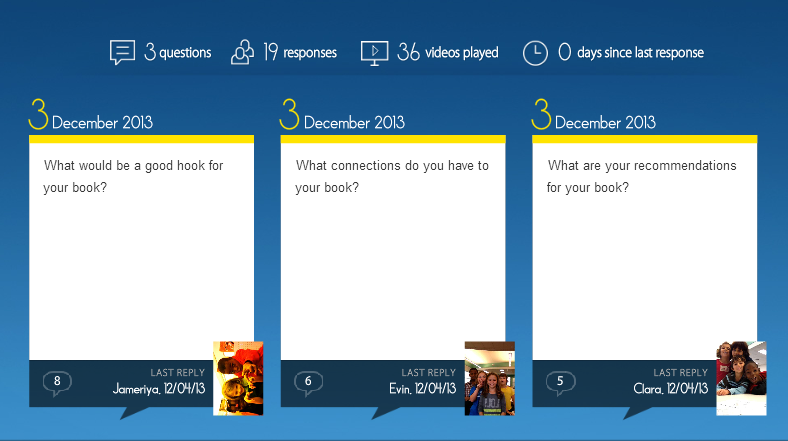 Next, I read the book Carnivores by Aaron Reynolds and illustrated by Dan Santat. I wanted students to have a chance to practice writing the parts of a book review, but rather than do it whole group, we used FlipGrid. I created a grid with 3 questions:
- What would be a good hook for your book?
- What connections do you have for your book?
- What are your recommendations for your book?
Each question has a code for flipgrid. I downloaded the app onto all of our iPads. For the app, students just have to type in the code to access the question. I printed each question with its corresponding code on paper to give to groups. Students divided into groups of 4 and were assigned one of the 3 questions. After doing this lesson with 2 different groups, I learned that for 2nd grade it was really important to write down what they were going to say, so students first wrote out their response to their question on an index card. Then, they practiced reading the card and deciding who would say each part on the recording. To record, students:
- opened the app
- typed in their code.
- touched the plus sign
- accepted terms
- took a photo
- recorded their response
- uploaded their video by typing a name and email
The videos were all sent to our grid. We gathered back on the floor to listen to some examples of hooks, connections, and recommendations. I also sent the link to the teachers so that they can refer back to the hooks, connections, and recommendations that were made as they begin to write their own book reviews. I imagine that these videos could become parts of mini-lessons about what makes a strong hook or how to write a stronger recommendation.
You can listen to their responses by visiting the grid.
I’m proud of these 2nd graders and their teachers for diving into an unknown tool. They learned about writing book reviews, but they also learned from their failures in using a new tool and passed on their learning to the groups that come after them. We had some great discussions about what we will remember the next time we use Flipgrid, and I know that the process will get smoother each time. I think Flipgrid will be a tool I will come back to again and again. In fact, I’m using it tomorrow with 4th graders to create a grid of book talks about civil rights leaders.




 Expect the Miraculous