Explorers and Native Americans: Perspective & Transliteracy with 4th grade

explorers & native americans (9)

Update:  This post is featured on Jane Yolen’s page for Encounter. 

Our 4th grade is studying Native Americans and Explorers.  When I met with the 4th grade team to plan, one of the main topics of our conversation was how we wanted our students to really think about perspective.  We didn’t want them to come away looking at the explorers as only a group of heroes, but instead to question what the costs were of their exploration.  We wanted them to think from the Native Americans’ perspective and consider how they felt about the explorers coming into their land.  We decided to approach this in a few ways.  The teachers planned regular social studies instruction in their classrooms.  They made Google presentations that were shared with the kids.  They also created graphic organizers for students to use to collect info.  Some students chose to have paper print outs of their organizers while others chose to fill out the organizer digitally.

Our guiding standards included:

SS4H1 The student will describe how early Native American cultures developed in
North America.
a. Locate where Native Americans settled with emphasis on the Arctic (Inuit),
Northwest (Kwakiutl), Plateau (Nez Perce), Southwest (Hopi), Plains (Pawnee),
and Southeast (Seminole).
b. Describe how Native Americans used their environment to obtain food, clothing,
and shelter.
SS4H2 The student will describe European exploration in North America.
a. Describe the reasons for, obstacles to, and accomplishments of the Spanish,
French, and English explorations of John Cabot, Vasco Núñez de Balboa, Juan
Ponce de León, Christopher Columbus, Henry Hudson, and Jacques Cartier.
b. Describe examples of cooperation and conflict between Europeans and Native
Americans

In the media center, I pulled multiple folktales from each of the Native American tribes.  During 2 separate sessions, we looked at Google Earth to see where the tribes were located originally.  Then as we read the folktales, we considered how location impacted the food, shelter, and clothing of the tribes by citing evidence from the tales.

The teachers wanted students to have access to multiple kinds of resources for their research portion of the unit.  We talked about classes coming individually to the library, but we ultimately decided that it would be nice for students to all be together in one location with multiple resources.  We scheduled 3 hour-long sessions.  I pulled together folktales, books about explorers, books about Native Americans, a pathfinder about Native Americans, and a pathfinder about Explorers.

During session 1, we met as a whole group.  I showed students a video of Christopher Columbus from National Geographic.  After the video, I asked students to think about how they would describe Columbus.  After talking with partners, I put as many words into a Tagxedo as possible.

These words were how students described Christopher Columbus after watching a video about Columbus.

These words were how students described Christopher Columbus after watching a video about Columbus.

Then, we read the book Encounter by Jane Yolen, which is the Columbus story told from the Native American perspective.  After the story, I asked the students to once again describe Columbus.  Their words made a big shift.

These words are how students described Christopher Columbus after reading Encounter by Jane Yolen.

These words are how students described Christopher Columbus after reading Encounter by Jane Yolen.

I followed up by talking about perspective, and how so many stories in history are silenced until the perspective of that group of people is brought forward.  I cited authors such as Phillip Hoose and Tanya Lee Stone who have written multiple texts about stories from history that have been untold.  I encouraged students as they did their research for this project to strongly consider perspective.  I did not want to tell them what to believe, but I asked them to be critical of the information they read and form their own opinions of history.

During sessions 2 & 3, all classes came back to the media center.  On one projection board, I posted the Native American pathfinder.  On the other projection board, I posted the Explorers pathfinder.  In addition, I made QR codes for each pathfinder and pulled out our cart of iPads.  I separated the books into 3 separate areas:  folktales, Native Americans, and explorers.  All students brought their netbooks, but they had the option to use the iPad if it fit their learning needs better than the netbook.  After  a quick reminder about our focus and where things were located, students freely moved around the media center.  About 75 students simultaneously made choices about which resources to start with, where to work, whether to work with a partner or small group or alone, and what technology supported their needs the most.  All 3 classroom teachers, a teacher candidate (student teacher), a gifted teacher, and I walked around and checked in with students.  Sometimes we were troubleshooting technology or redirecting, but often we were able to have individual conversations with students about the information that students were collecting.  Teachers worked with all students regardless if they were in their class or not.

What amazed me the most were the decisions that students made about their learning.  I saw transliteracy in action.  As I walked around, I saw students with pencils, papers, iPads, netbooks, and books all spread out around them.  They were simultaneously moving from one device or tool to the next.  Some students sat at tables while others sat inside bookshelves.  Some students tucked away by themselves while others worked in a large group.  Some students worked with very few resources at a time such as 1 book while others had every possible resource in front of them at once.  After months of wondering about how our space would support the kinds of learning I hope to see in our library, I was finally able to truly see it today.  I saw every piece of furniture in use.  I saw students combine pieces of furniture to make themselves comfortable for learning.  An entire grade level descended upon the library and remained productive while groups of kids were still coming into the library to checkout books.explorers & native americans (15)

It was loud, energetic, productive, and fun.  It’s a model I hope to replicate with other groups and a model that I hope carries into our classrooms, which can now accommodate some of these sames types of opportunities.

Little Free Libraries Open for Business

Barrow Little Free Library

Barrow Little Free Library

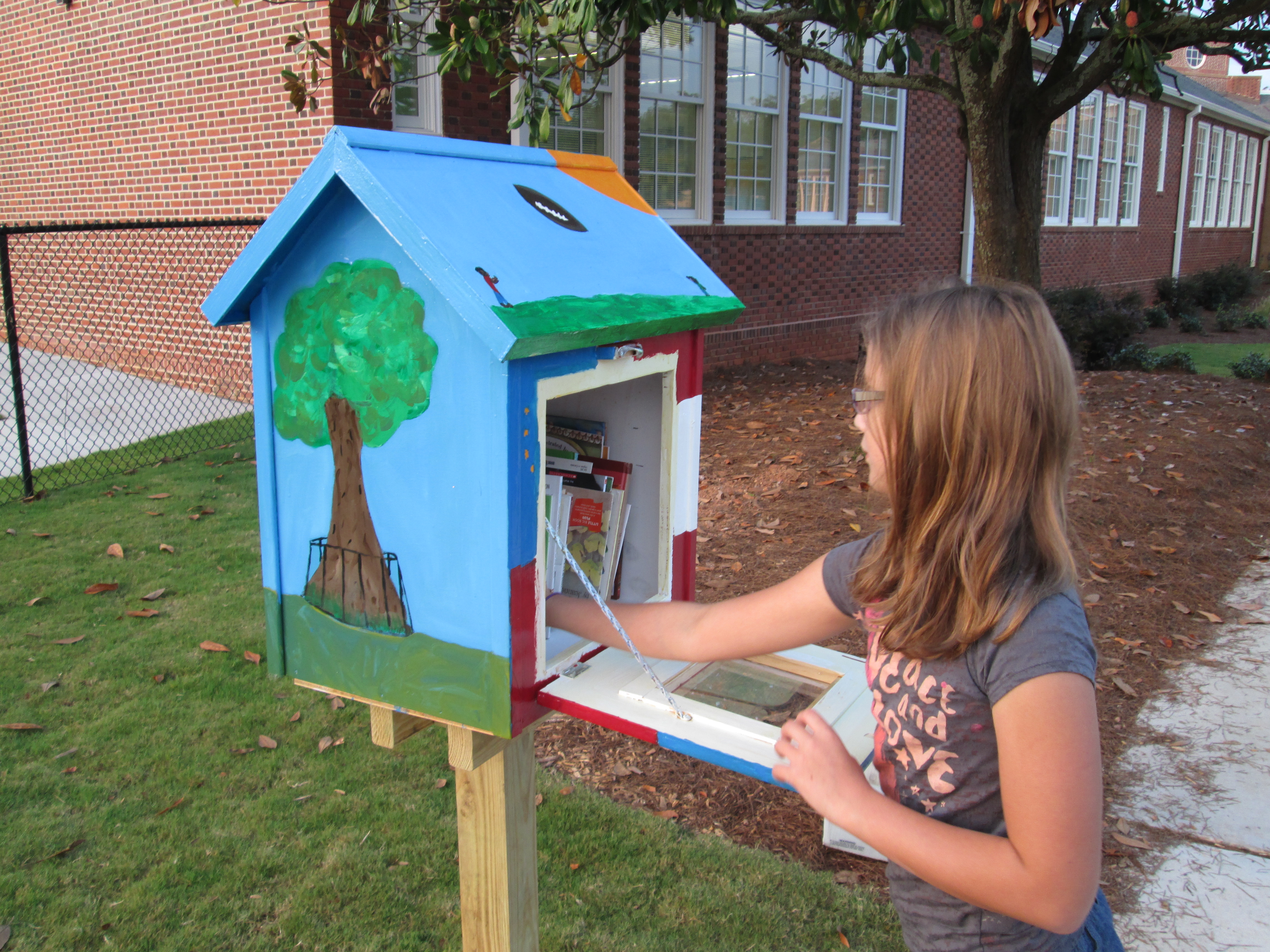
After a year long project with last year’s 5th graders, our 2 Little Free Libraries are finally open for business.  This project has been one of the most meaningful ones that I have been a part of.  Just to highlight a few accomplishments of everyone involved:

  • After a post on the Barrow Media Center Facebook page that simply described a wish to have a LFL, teacher Sara Cross jumped on board to make this project happen in 5th grade.
  • Art teacher, Rita Foretich, along with her student teacher took a huge leadership role in creating multiple jobs for students, using Google sketchup to design libraries, and committing to painting the libraries in art.
  • Co-founder Rick Brooks took time out of his busy schedule to skype with our students to answer their questions and encourage them on their project.
  • Students in 5th grade wrote persuasive letters to multiple places which resulted in Lay Park becoming our 2nd location and Home Depot built and donated the 2 libraries and paint.
  • Students in 5th grade encouraged students in the whole school to donate books which resulted in about 18 boxes of used books to fill the libraries.  Other incredible supporters like Barrow grandparent, Camilla Bracewell, donated money to support the registration of the libraries and additional supply & book purchases.
  • Our project won the Eve Carson Service Learning Award at the 5th grade moving on ceremony

Our move into our new school delayed our installation a bit.  Mrs. Foretich kept the libraries over the summer and gave them some coats of clear coat to protect them from the weather.  Her husband also spent time making sure that the doors on the libraries opened smoothly after getting a bit sticky from the clear coat.

We entered this year with one big final step:  installation.  I should have known that once again our community would step up to support this project.  Susan Henderson, librarian at Fowler Drive, suggested that her neighbor Chase Cook, who is a Barrow parent, would be a good person to contact.  She even took time to ask him herself.  Chase was more than happy to help.  Another Barrow parent, Chris Adams, was suggested, and without hesitation he also agreed to help.  I was amazed that two parents who weren’t even involved in the project along the way were so willing to step up and offer their talents and service to this project.  Chase and Chris spent a hot Friday afternoon digging the holes at Barrow and Lay Park and installing both libraries.  I can’t thank them enough for their time and hard work.

Refilling the Barrow Little Free Library

Refilling the Barrow Little Free Library

On Sunday September 8, I filled the Barrow Little Free Library with books.  The Barrow library features our school theme of “Where am I in the world?”  You’ll find the tree that owns itself, Georgia peaches and peanuts, the GA flag & US flag, and GA football.  This week on our morning news show, I showed a video to all students explaining what this new mysterious box was all about.

http://www.youtube.com/watch?v=oZ75bvCpXAQ

The afternoon after the video was shown was a busy time for our library and it was almost empty that day as students were eager to take home a book.  We’ve already had to refill it once.

Lay Park Library

Lay Park Library

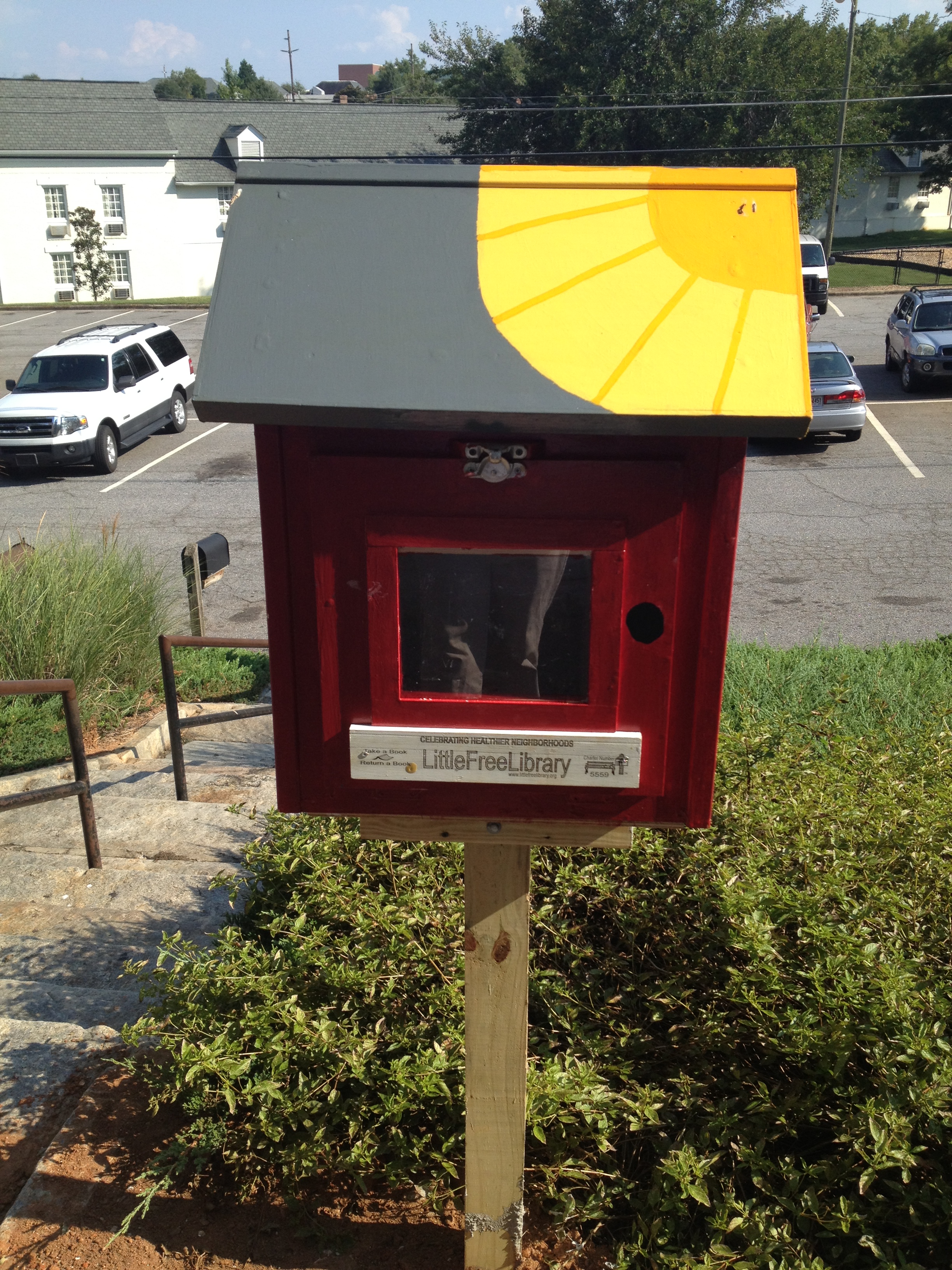
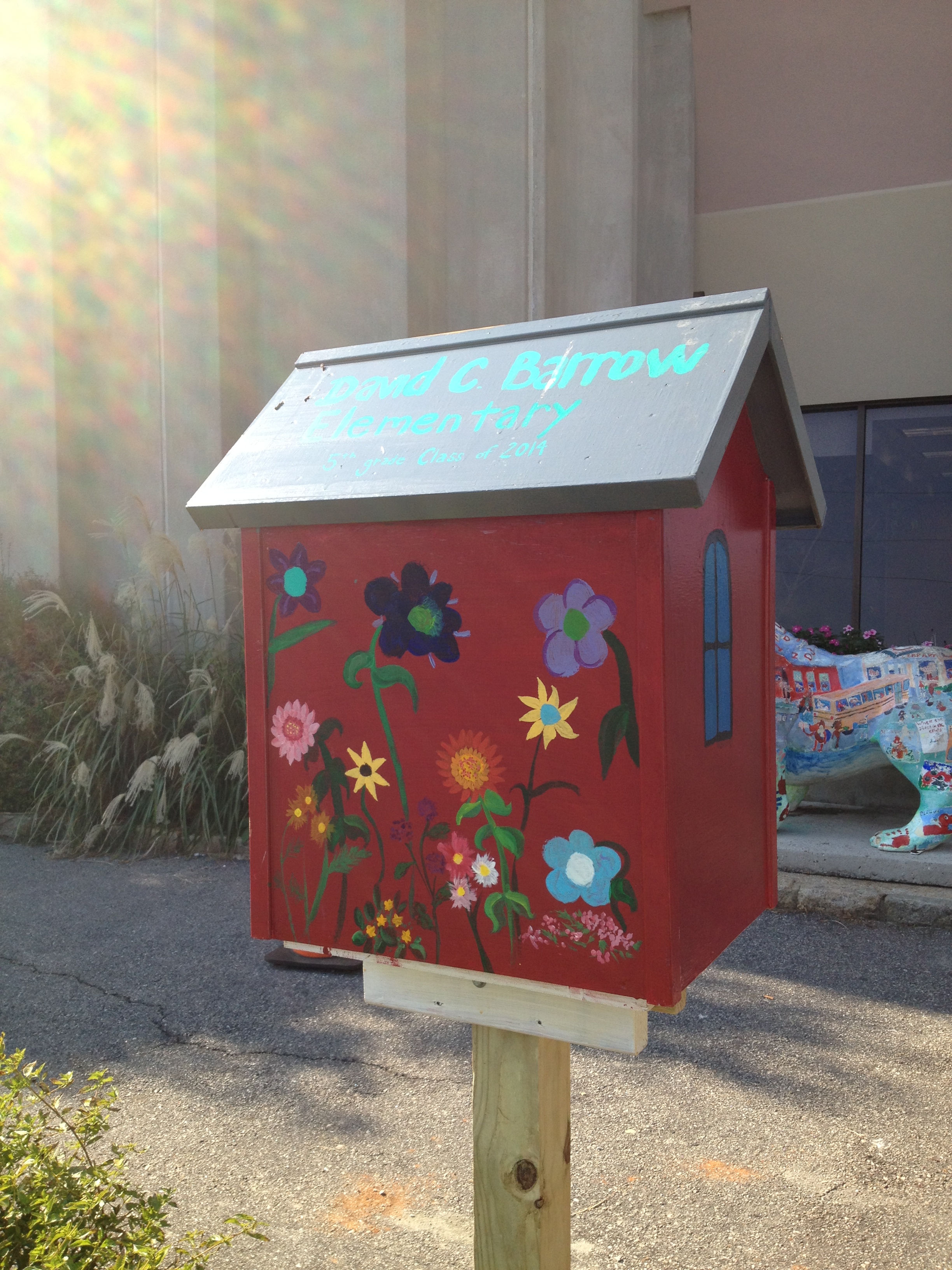
On Monday September 9, Randy Haygood opened the Lay Park Little Free Library.  This library features an old Barrow school look.  A giant sun radiates from the roof and the back features a beautiful flower garden.  I delivered 6 boxes of books to him so that he would have books to refill the library for a few weeks.  I can’t wait to see how this little library supports reading at Lay Park and the surrounding communities.

Lay Park Library back view

Lay Park Library back view

These libraries are truly a gift.  They represent so many voices, ideas, and creativity from students, parents, grandparents, and our community.  Thank you Athens community for supporting this project.  Enjoy these libraries for years to come.


And We’re Off! (with a new take on library orientation)

IMG_0856I’ve always wanted to try something different for library orientation rather than have the students sit on the carpet for 30-45 minutes while I talk on and on about how to use the library, check out books, and take care of books.  This year, especially, I knew that students would be eager to explore their new library space rather than sit and stare at it from a distance.  So….I made a plan for 2nd-5th grade and a plan for K-1.

For K-1, we stayed as a whole group and watched a few of the videos together.  I may try letting 1st grade scan one of the QR codes just for practice, but I felt like whole group with a story was still the way to go for the younger students.  We read the book Sky Color by Peter Reynolds to make connections to the library being a place to be creative and think outside the box.

For 2-5, I made a list of the major topics that I wanted students to think about when learning about the spaces in the library and the basic functions such as checking out a book.  From there, I made a video for each of those topics using an iPad and  uploaded it to Youtube.

http://www.youtube.com/watch?v=tXyCKIQwTo8

I took each link and generated a QR code.  I put each QR code on its own piece of paper with some brief instructions.  For example, the check out QR code said to scan the code and go to the circulation desk before watching.  On our iPad cart, I downloaded a QR reader and tested all of my codes to make sure they worked.IMG_0833

During orientation, I put out the QR codes that I felt like that grade level needed the most.  Lower grades had fewer QR codes to scan while the upper grades had them all.  For some classes I made a table of codes that were the “must scan” codes and then a table of codes for “if you have time”.  We started our time on the carpet in order to do a welcome, refresh using iPads safely, and to demo scanning a QR code.  Next students got an iPad and plugged in some headphones from the library (or their own) and began scanning codes.  I would love to say that it was perfectly smooth, but of course students had trouble adjusting sound, some headphones weren’t plugged in all the way, and some headphones weren’t working.  However, once the glitches smoothed out, it was amazing to see students productively wandering around the library with iPads doing a self-guided tour just as they would do in a museum.  In the process, they walked the entire library, tried out multiple places to sit, found out about technology they would use throughout the year, and saw books that they wanted to checkout.  I felt like even though they heard the same information each student gained something different out of the orientation.

At the close, we came back together to share some things that they learned about our library.  I wish that we had more time for this reflection because it gave me so many insights into what students valued in the library and what they were still wondering about.  At checkout, I saw students doing some of the exact same things that I did in the video.  I also saw students looking for books that they saw on shelves in the videos.  Overall, students got a lot of the same information, but this was much more engaging,  involved movement, and gave students the option to watch something again if they didn’t understand.  We’ll see how this translates into library use during the year, but I felt much better about how this new take on orientation went.

Today was exciting.  For the first time, I saw 2 years of planning a library space begin springing into action.  I saw how much the students are going to move this furniture around to meet their needs.  I saw how visible the books were on the shelves, which leads me to think we’ll have even more circulations this year.  This was only day one of classes.  I can’t wait to see how the space grows, evolves, and becomes useful to the students and the kinds of learning they will take on for years to come.

Setting Up a New Elementary School Library (Part 3)

It’s hard to believe that the unpacking and arrangement of our new school library began only one week ago!  As of today, every box has been unpacked thanks to many hours of work from me and some dedicated volunteers.  This included working on 2 furlough days and the weekend.  There’s still a lot to do, but it’s nice to know that everything has been unpacked!

When people walk by, I often hear, it looks like you are all ready.  I’m glad that the library looks like a library as our kids enter the building tomorrow, but there are many things left to do like:

  • Setup our iMac computers for video editing
  • Setup up our morning broadcast equipment and prepare the schedule/contracts of the new crew
  • Get power and data installed to the circulation island and have technology image the new circulation computers
  • Install a wall case which includes 2 white boards and a touchscreen for ebooks
  • Finish putting together 2 computer tables
  • Put together our lego robotics area
  • Update 30 ipads and make sure they are working for the new year.  Install apps that have already been requested
  • Re-label and re-catalog over 200 books that were pulled from fiction in order to move to everybody, graphic novels, and series sections
  • Distribute 250+ netbooks to classroom teachers after shuffling them among the carts to make grades 3-5 one to one
  • Test out media center equipment and how it interacts with our new projectors before releasing it to teachers to check out
  • Create some type of signage to help students in locating the books they need.  I may get students involved with this piece soon!
  • Create orientation videos that students may use to make orientation more individualized
  • Finish setting up the teacher book room which includes guided reading books and professional books.  Also setup a self check-out/check-in area in this room
  • And several more things……

Today I want to highlight some of our areas of the library that I haven’t talked about yet.  One is circulation.  Throughout the planning of our library, I repeatedly said that I did not want a circulation desk.  We don’t have a library paraprofessional at the moment, and even if we did, we don’t sit behind a desk all day.  Instead, I wanted a self check-in area and a self check-out area with places for students to easily store books that were checked-in.  We went through many rounds of discussions and drawings, but this is what we came up with:  a circulation island.

Circulation island instead of a clunky circulation desk

Circulation island instead of a clunky circulation desk

As students enter the library, they will turn right, check in their books at the check-in computer, and store their books on one of two rolling carts stored underneath the circulation island.  If both of these carts fill up, a third rolling cart can be pulled out to replace one of the filled cart.  This third cart also stores within the island.  Once students find their books, they will stop by the opposite side of the island to check-out their books as they leave.  On the wall right behind the island, there will be casework with multiple opportunities for displaying student work and books.  There will also be a touch screen where students can browse the ebooks in our collection.  I hope that this becomes a user-friendly area for our students.


Some shelves have stools within the curves where students can sit and read or use the shelf as a counter/work space

Some shelves have stools within the curves where students can sit and read or use the shelf as a counter/work space

Another item I want to feature in our library is the multiple ways that students can sit and interact with the space.  The curves of the shelves provide opportunities to put stools, bean bags, or soft curved seating.  With stools, students can sit and read or they can face the shelf and use it as an additional workspace.  As I display books on the tops of shelves, I’ll try to leave spaces open so that students can take advantage of these workspaces without having to move all the books.

At our iMac video editing stations, students can sit on the rectangular soft seating, wobble around on a Hokki stool, or pull up a chair that can face forward or backward.  It will be interesting to see which seating gets used more than the other.

iMac video editing stations

iMac video editing stations


There are many more features that I look forward to sharing in the coming days and weeks, especially as students start to use them.


Setting Up a New Elementary School Library (Part 2)

Fiction shelves minus some popular series

Fiction shelves minus some popular series

Today was our second day of unpacking boxes into our new school library.  After being away at a meeting yesterday, I spent some time walking the space and thinking back through Monday’s decisions.  For the most part, I was still happy with what was decided.  I flipped one shelf around in the fiction section and it really opened up the flow into the library better.  Some new rolling tables had arrived, so I worked on putting those into the 2nd projection area where I think students will most likely use devices while paired with demonstration on the projection screen.  I decided that the Lego robotics table will move from its current position near the front of the library into the back corner.  The wall I chose has no outlets.  This allows the wall with outlets to be used for computer tables.

New rolling flip tables

New rolling flip tables

My first volunteer, Camilla Bracewell, arrived and quickly got to work unpacking fiction onto the shelIves.  While she worked, I began unpacking equipment into the equipment room.  The equipment room, workroom, and office are rooms that I have to do myself because I have to figure out the best place to put each thing.  In the equipment room, I put our ereaders and digital cameras out on the charging shelves.  There aren’t as many outlets as I would like, but for the first time I can actually lay out all of this equipment and easily plug it in to charge.  All of the cords run down through the shelves to the outlets.  I put the most frequently used things out in clear sight and things that are less used went in closets.

Fiction ready to shelve

Fiction ready to shelve

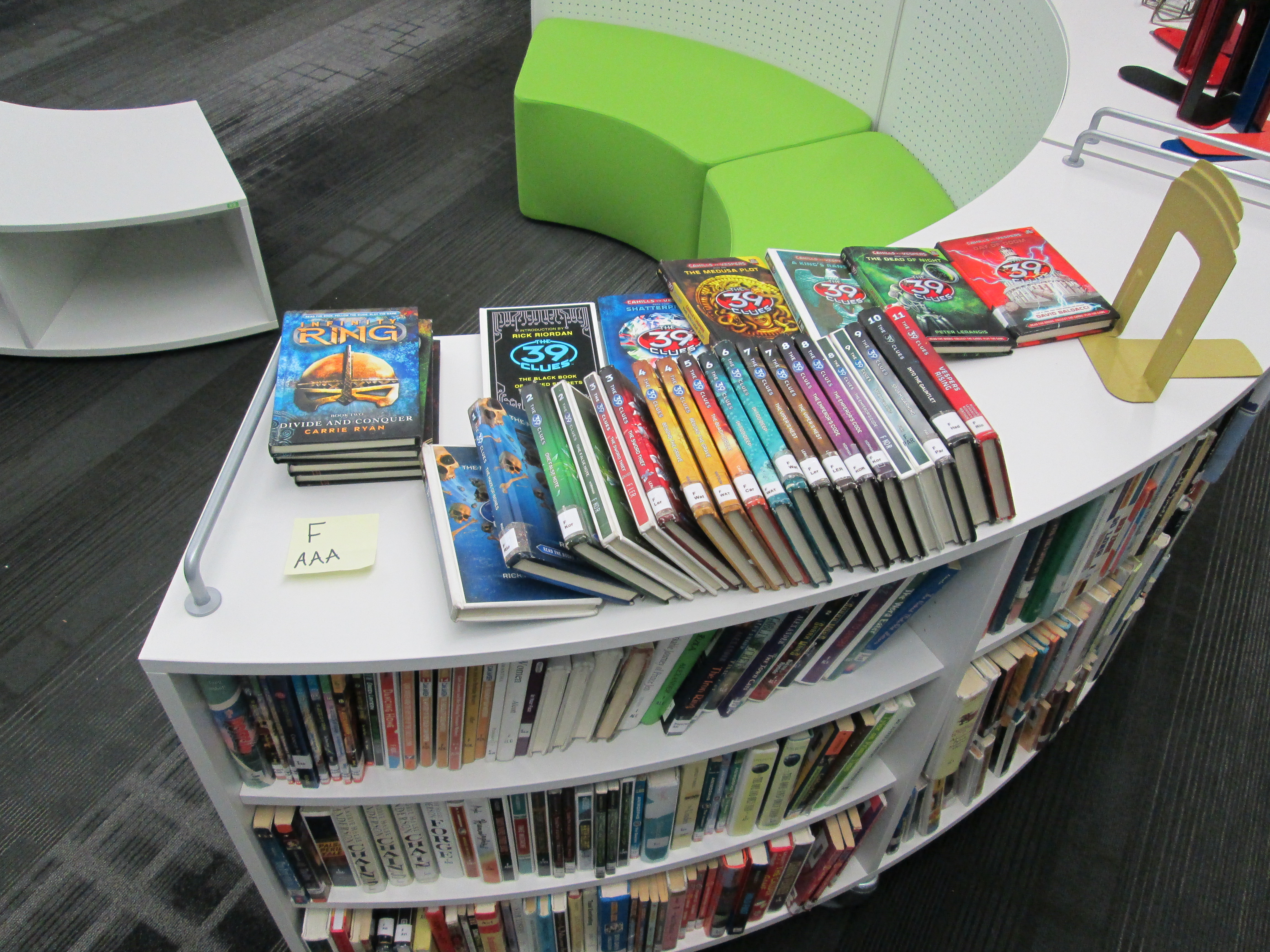
It didn’t take long until our first problem of the day.  The fiction books didn’t fit on the shelves.  That statement has multiple meanings.  Some books were too tall for the shelf so they had to be turned sideways.  Other books were pulled to put in other sections of the library like graphic novel and everybody.  The worst part though was that all of the shelves were full and there were still 4 boxes to unpack.  First I tried to think of how to get another shelf, but then I started thinking about what could be pulled from the fiction and put somewhere else in the library.  We are still missing 3 big display cases that will have multiple functions.  One function is holding books, but without the cases in place it’s hard to decide what to put on them.  I decided to go around and pull some of the most popular series of books from the fiction shelf so that they could go on this display.  The next step would be to shuffle all of the books down the shelves to fill empty spaces.  I know that the books will fit if I do this, but i decided to delay this part of setup until I know more about the cases that are coming.

Putting the 39 Clues together

Putting the 39 Clues together

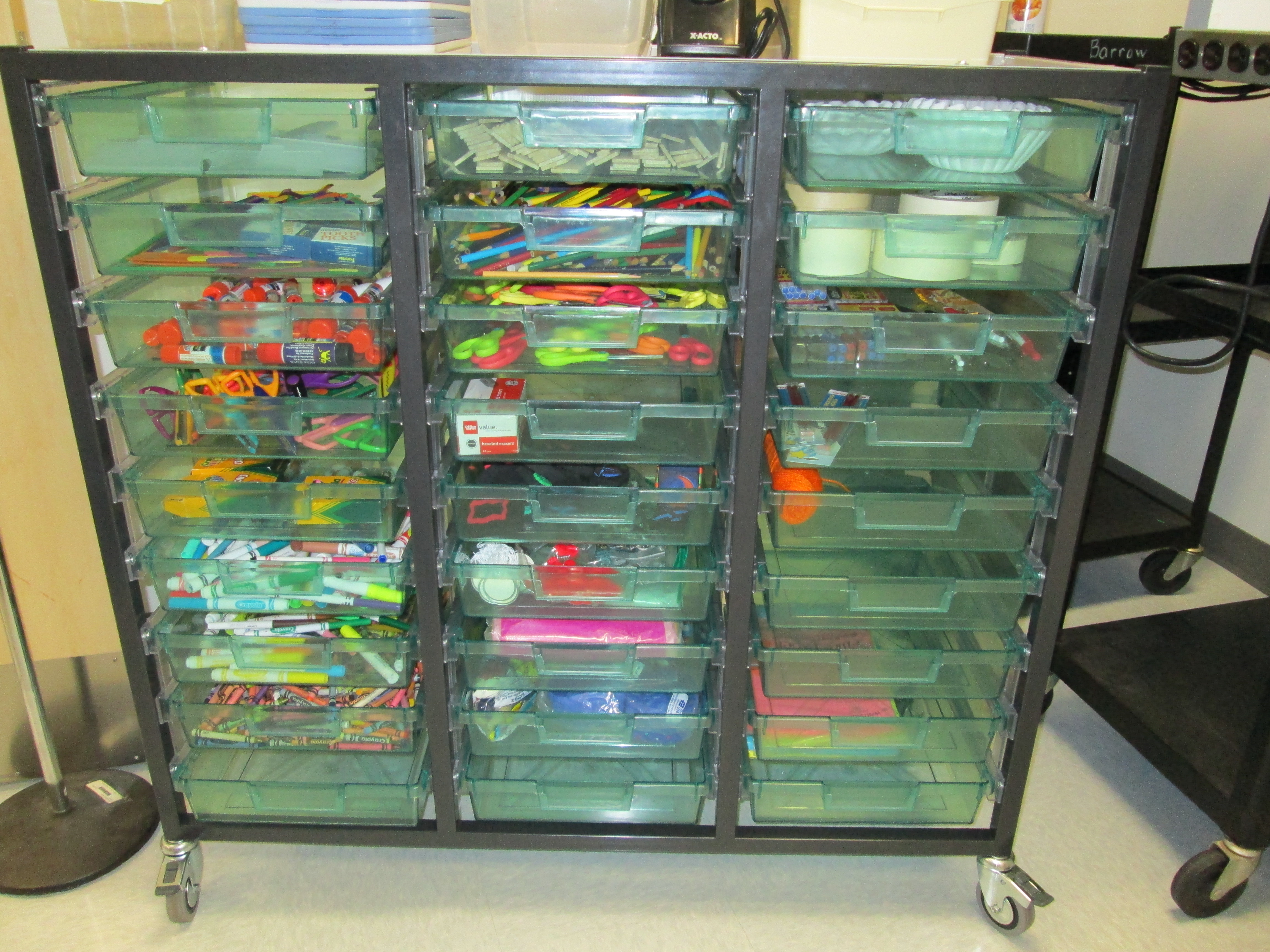
Rolling maker space supplies

Rolling maker space supplies

Next, I began unpacking all of the supplies.  I love the rolling cart of drawers that I have.  It tucks underneath the storage cabinets in the workroom but easily rolls out for students to use.  Each thing that I put in this cart fit in with my thinking about maker spaces in the library.  Each thing had to be something that students could use:  paper, pencils, crayons, markers, scissors, craft scissors, tissue paper, popsicle sticks, streamers, buttons, etc.  Other supplies went into drawers that will stay in the workroom.  In one storage closet, I made one side supplies and decorations and the other side instructional resources.

Throughout the day, the son of my former paraprofessional began arranging all of the rooms in our teacher book room with class sets of books and guided reading books.  This is a huge amount of boxes and took a long time just to get the boxes in order.  We haven’t even started the process of unpacking those.

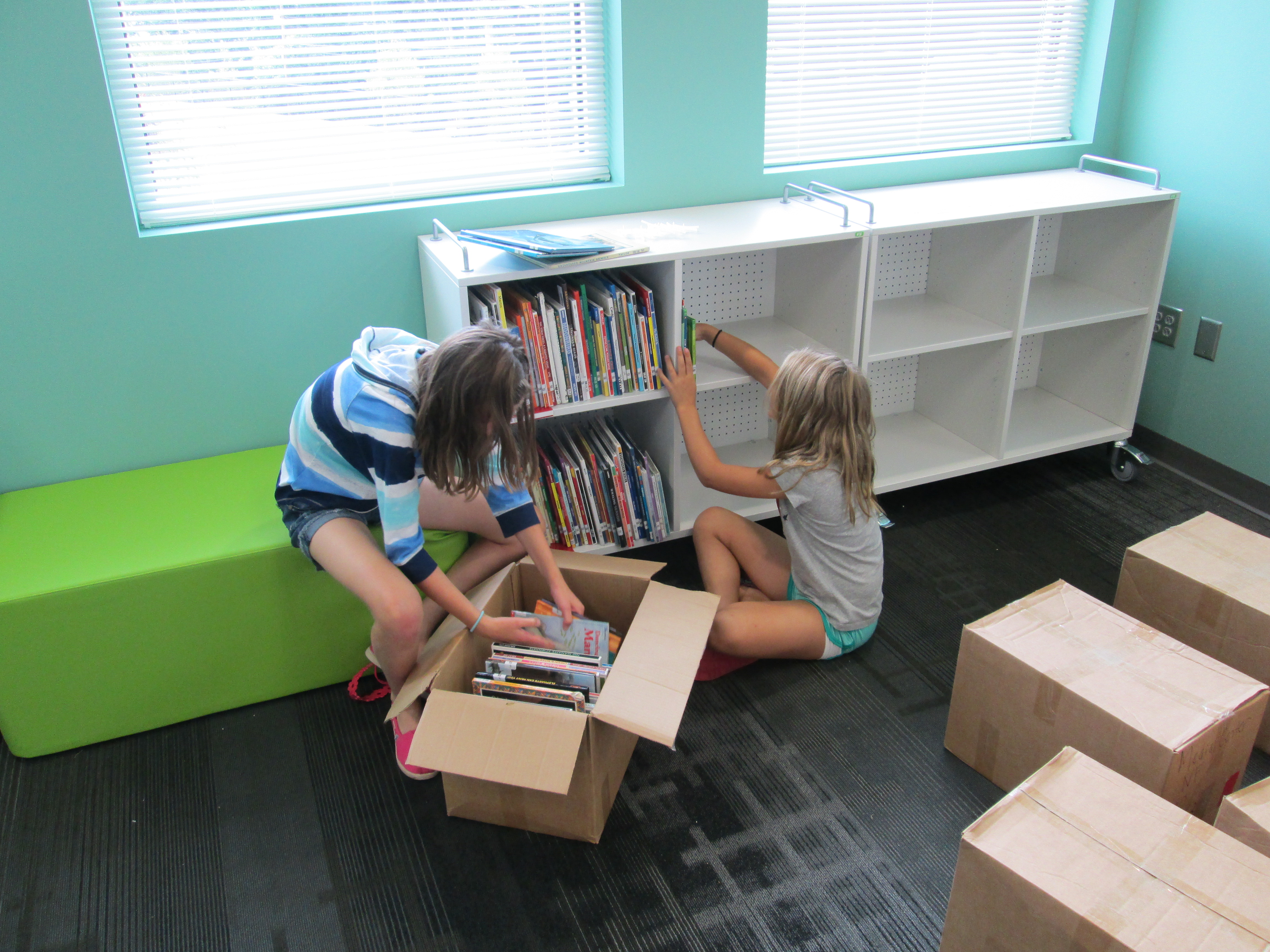
By the end of the day, a dad and daughter came and unpacked the biographies.  They fit them onto 3 carts, but there was shelf space left over.  I was curious if all the books could fit onto 2 carts to free up one cart.  We shuffled these around and very tightly fit biographies onto 2 carts.  I don’t like that it’s so packed, and I’m not sure if I will keep it like this.

Current student and alumni student helpers

Current student and alumni student helpers

Jennifer McDowell and her daughters (one Barrow student and one alumni) came and unpacked the nonfiction section up to the 700s.  For now, they packed the shelves tightly, but I hope we have enough space to go back through and free up some space in each section.  This was a big task for them because the hand truck had been borrowed by other teachers.  They had to carry each heavy box out of the hallway and across the library to unpack it.

In the midst of all of this, a whiteboard was installed.  Three different workers came to ask me where various computer equipment should be installed.  We realized that one projector was not wired into the network.  I questioned the height of the circulation island for our younger students.  Multiple teachers came to ask questions about technology, upcoming projects, and their own shelving in their rooms.  I submitted a purchase order, and who knows what else I did and don’t remember.  This is exhausting, but each time someone walks in they already talk about how inviting it is.  With each unpacked box and piece of furniture, we move one step closer to a new school year.  It’s truly exciting.


Setting Up a New Elementary School Library (Part 1)

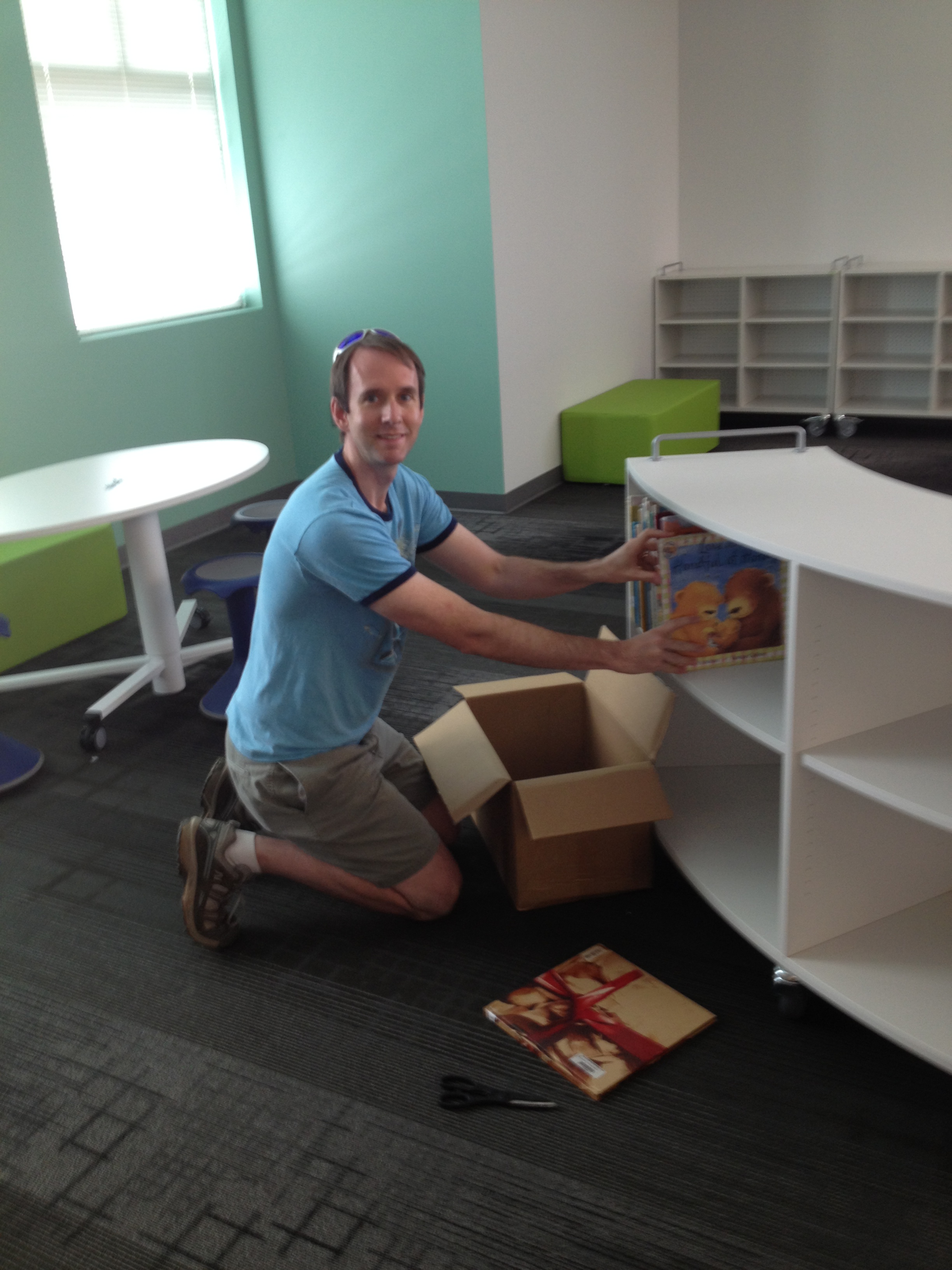
I had the honor of putting the very first books on the shelves

I had the honor of putting the very first books on the shelves

After my last post (New Beginnings), I’ve received several requests to document the process of setting up our new library space.  It is an exciting and exhausting process to walk into a big open room with endless possibilities.  As I’ve said before (and keep repeating to myself), the space can and will change once students begin using it.  I can only guess what might work best for students, but the beauty of the furniture and shelving that we have is that it can fairly easily change into something new if it doesn’t work the way I’ve set it up.

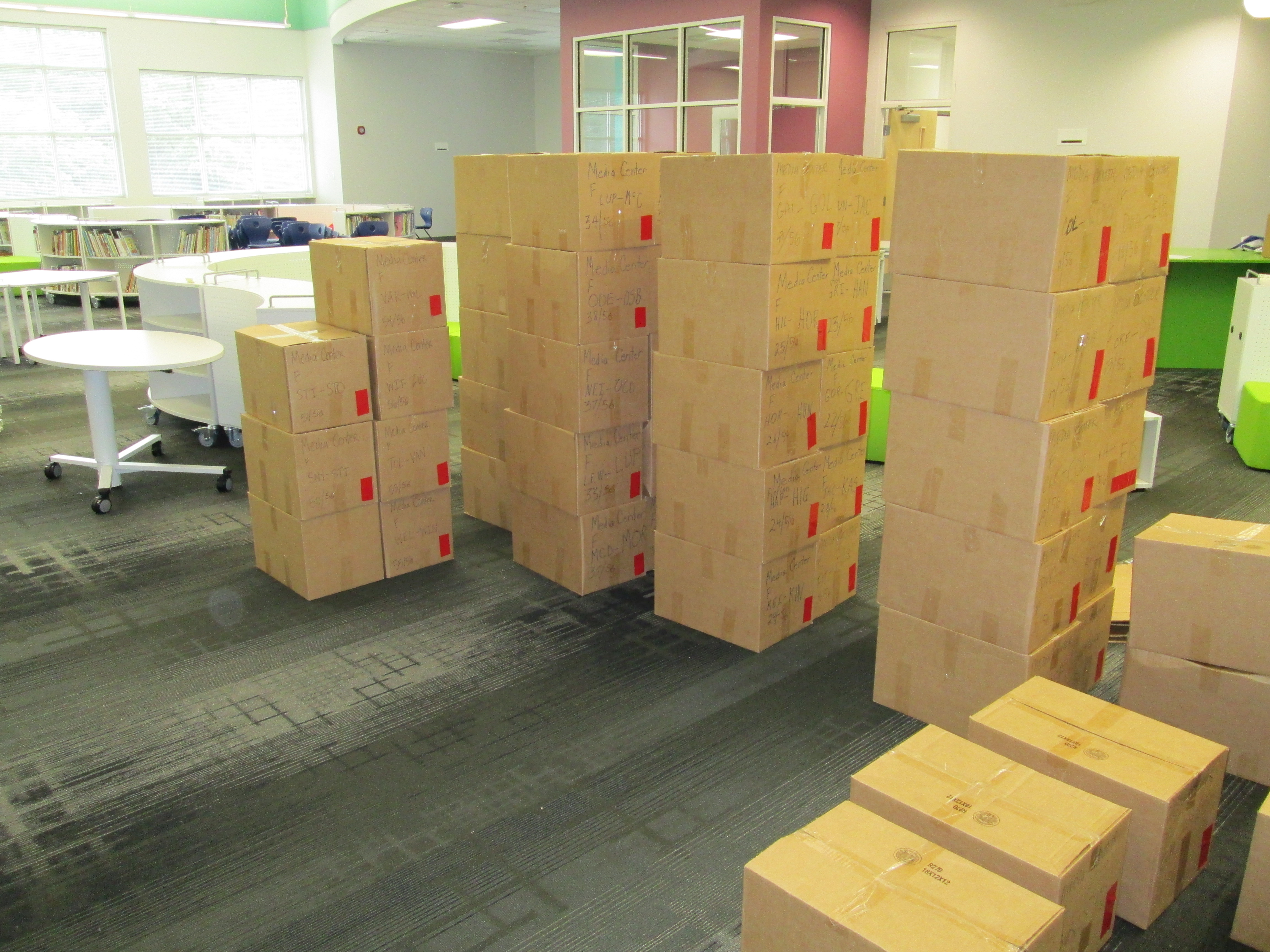
Over this past weekend, our SPLOST director, David Stubbs, spent many hours with a few helpers moving all of the boxes out of the library and organizing them by category.  This was supposed to be done by the movers, but it wasn’t.  He also made sure that all furniture that didn’t belong to the library was delivered to its proper place.  This morning, I walked in to see several possible configurations of the shelves, soft seating, tables, stools, and chairs.  David walked me around and talked about what he knew about each set of furniture.

Next, my first volunteers arrived.  The wonderful Camilla Bracewell, Barrow grandparent, and Carole Langley, spouse of an early Barrow alum, began working on shelves.  All of the carts have 3 shelves, but many of our library books are tall, so each cart needed to be switched to 2 shelves.  They adjusted the “Everybody” shelves and began bringing in the “Everybody” boxes and sequencing them.  I had numbered the boxes 1 of 37, 2 of 37, etc. so that we could easily put them in order.  Once in order, they began packing the shelves with books until they had to leave.

While all of this was going on, Julie Moon, Barrow parent and professional organizer, helped me think through all of the spaces in the library.  She took the lead on rolling around the remaining shelves to see all of the possibilities we could create for the various sections of the library.  Each time furniture was moved, we thought about why it was being moved.  For example, some oval rolling tables were moved away from the main instructional area because we decided that they would be great areas for students to collaborate or for teachers, mentors, or volunteers to work with students.  The spaces wouldn’t really work well if they were right next to each other, so we changed it.  We worked on this from about 10AM-2PM, and I think when we left at the end of the day, we felt pretty good about the placement of all of the furniture.  There is a bit more furniture to come, so the arrival of those pieces might change some things.  We did our best to think about these pieces as we were laying things out.

Julie continued working on the Everybody section and realized that we had packed the shelves a bit too full.  She went back through the entire section and shuffled the books on the shelves so there was a bit of space on each shelf for some expansion.

Jaison Jacob, a Barrow parent, and his daughter came at the end of the day and helped switch a few more of the shelves from 3 shelves to 2 shelves.  To end their time, they rolled all of the fiction boxes into the library to get ready for our next wave of unpacking on Wednesday.

Before I left, I went around and labeled each section of shelves with post-its so that volunteers can easily see where sections are.

I can’t say enough about the amazing volunteers that came today.  They took over some of the strenuous work so that I could step back and think through the space and layout.  I look forward to the coming days and several more wonderful volunteers popping in to support this space.  I love the ownership of the space already by parents, grandparents, alumni, and friends.

New Beginnings

media centerIt’s that time of year.  Time to  begin thinking about a new school year, new students, new families, new amazing ideas, new innovative projects, and more.  However, this year brings another big “new” thing:  a new library!  After 2 years of planning, our new school is almost ready.  Workers are busily putting on the finishing touches and boxes and furniture are arriving daily.

The process for designing the new media center has been incredible.  I have been involved every step of the way.  There have been multiple meetings, emails, feedback sessions, brainstorming, etc. to put together the space that students will see in just a few days.  The word that we carried with us throughout the whole process was “flexible”.  I wanted a space that would be as flexible as possible to allow the space to change and adapt to the kinds of learning that students were involved in.  At no time has it been about the stuff.  You certainly have to consider the stuff all along the way, but what students, teachers, and other learners are doing within the space is what matters most.

In our new library, you’ll find 2 projection areas.  One will be more for story time, discussion, gaming, guest speakers, etc. where students will sit on the floor and the other area will have tables where students can use devices and have a work space while things are shared or demonstrated on the projection board.  Our circulation area will not be a traditional desk but more of an island.  Students will check in their own books, store them on carts beneath the island, and then check out their own books on their way out.  There will be multiple spaces for students to sit, collaborate, read, etc.  This will include tables, chairs, stools, counters, bean bags, and other soft seating.  I hope that this creates a mix of quiet areas for students as well as areas for more noise, conversation, and collaboration.  All of the book shelves will roll so that they can be easily moved to accommodate larger groups or learning needs. The shelves hook together with magnets.  Students will have access to an interactive screen for perusing ebooks.  There will be a studio where we will use iPads to record and macbooks to edit video.  Even this studio is completely mobile and won’t feature the traditional video cameras and multiple wires running across the floor.  I can’t wait to see how the space works and how it evolves.

For now, this is how it looks.  It’s an overwhelming task to take the brainstorming and visioning and turn an empty room into those ideas.  My team of volunteers will be hard at work next week and into the beginning of the school year getting everything ready.  We are still waiting on some center casework to be installed as well as casework at the entrance to the library.  Our space probably won’t be ready on day 1 of school, but I will count on some miraculous things happening in this amazing space later this school year!

Ms. Li’s Class Alphabet Book

I recently posted about a project I have been doing with Kindergarten where students created a class alphabet book using Photo Story.  Today, Ms. Li’s Class finished their book.  Enjoy!


http://youtu.be/SipA4Tie_xY

Destiny Quest Mobile App

Great news!  Now our library catalog can be accessed through your smartphone.  View this video to learn more about the features.  Please note that you will only see “library” and “webpath” in the tabs of your mobile Destiny Quest.

To install the app, visit your smartphone app store and search for Destiny Quest or Follett.

For Android, click here.

For Apple, click here.

Once you download the app, you’ll need to set it up by entering our URL, which is:   destiny.clarke.k12.ga.us

Next, select David C. Barrow Elementary.

Finally, your child can login to his/her account by entering his regular usernameand password from school.

Enjoy!

Media Center Buzz November 18, 2011

As I’m thinking about redesigning the Barrow Media Center for our new school, I’m trying to periodically document through pictures and videos how the media center is currently being used.  I’m trying to think about what is working in our space, what’s not working, and what could be happening.  Here’s a look at the video that I captured today when approximately 100 students were in the media center at the same time.

Media Center Buzz November 18, 2011