

The entire 5th grade came together to code using Scratch.
I am so energized by the excitement I saw from Kindergarten, 1st grade, 2nd grade, and 5th grade students yesterday and today during our Hour of Code. Here’s what each session looked like:
1. I asked them how many of them liked to play video games, iPad apps, computer programs, or knew someone who used Facebook. Pretty much every hand shot up. Then, I asked them how many of them knew how those programs were made and their hands shot down. However, when I asked how many of them would like to explore how computers and games are programmed, pretty much every hand went up again.
2. We watched 1 or 2 videos like these:
3. I briefly introduced the tool that students would use and gave them the short link.
4. I gave some ground rules:
- Coders don’t give up. They try, make mistakes, and learn from those mistakes.
- Coders collaborate. Ask 3 other students for ideas or help before asking me.
- Have fun!
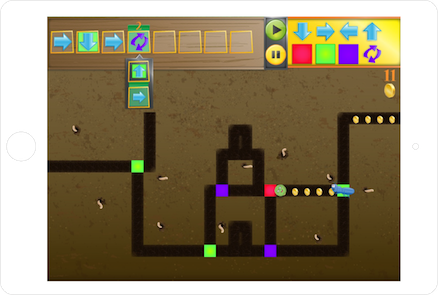
Kindergarten and 1st grade students worked with Kodable to program a rolling fuzz ball to move through a maze collecting coins. Our 2nd graders used Tynker to program a puppy dog to perform various commands. Our 5th graders used Scratch to design an interactive holiday card.
At tables, I watched students leap into coding. They hit speed bumps right away. Many began asking one another, but there was still a tendency to ask me. I helped at times but facilitated students talking to one another most of the time. Since I had seen all of the tables, I knew which students had figured out some of the coding tricks. I used this knowledge to nudge students toward one another. Many of them really stepped up to help their peers and students who weren’t always looked to as an expert suddenly found themselves being the go-to person. It was empowering!
 Another amazing thing was having the entire 5th grade working together in the library. They were eager to jump in and use Scratch, which most of them had never seen or heard of. For the most part, they quickly settled in around the library in groups or by themselves and got to work. As they figured out things, they shared. Some of them left having a complete card made. Others left with a start. All of them left with a better understanding of how to use Scratch and an excitement for coding. There is great potential in this energy that has been generated.
 Our days were not without problems. Our school internet seemed particularly slow. The Hour of Code sites were also swamped with visitors, so these two combinations made some of the tools impossible to load. We had to completely change our 2nd grade Tynker lesson on day 1 because it wouldn’t load. Instead, students used blockly and Kodable. Kodable was our reliable app of the day. When students all tried to login to Scratch, they kept getting bumped out. Also, they had trouble signing in, so several left without a chance to save their work. All of these glitches didn’t dampen the excitement for coding.
Throughout the days, students added some reflections about what they learned to a Flipgrid. This grid was also shared on Twitter so that students in other schools could add as well. We have several more lessons planned across Wednesday-Friday and next week students will participate in a coding smackdown in Google Hangouts. They will have a chance to share their learning and creations with others around the country.




 Expect the Miraculous