What a week! We connected the dots with so many places around our country, shared great stories, learned about other perspectives, and viewed student-created masterpieces. I love the conversations that Dot Day brings out in our students.
It was an amazing week, and this time I’ll just let the pictures and tweets speak for themselves.
We love Dot Day at our school. We connect with classrooms around the country across the whole week. Our students love reading stories and creating dots in creative ways.
This year, our 5th graders are studying cells in science at about the same time as Dot Day, so we decided to connect the two. Each class came to the library and we spent some time talking about “making our mark” and what that really means. We gave examples of students who are already making their mark this school year. I tried to emphasize that a big part of this is trying new things and just seeing where it goes. We never know when we try something new if it is going to lead us to something awesome.
After this quick mini-lesson, students had a chance to tinker with Google Drawing. I showed them where it was within Google Drive, but really gave no instruction on how to use it. They had about 15-20 minutes just to click on everything they could find and see what it did. Some students found a groove and actually created something they were excited about while others gave themselves permission not to worry about what the page looked like and just get messy clicking buttons.
During the tinkering time, there was a group of students who suddenly started using Google Drawing to make their own emoji. When I started asking them about their work, they were a bit shy at first because they thought they were in trouble. However, I told them that new emoji are being created all the time, and they never know when their ideas and creations might lead to the next emoji on our phones. They were eager to carry on with their work. I saw other students designing their own jewelry and another creating a building design.
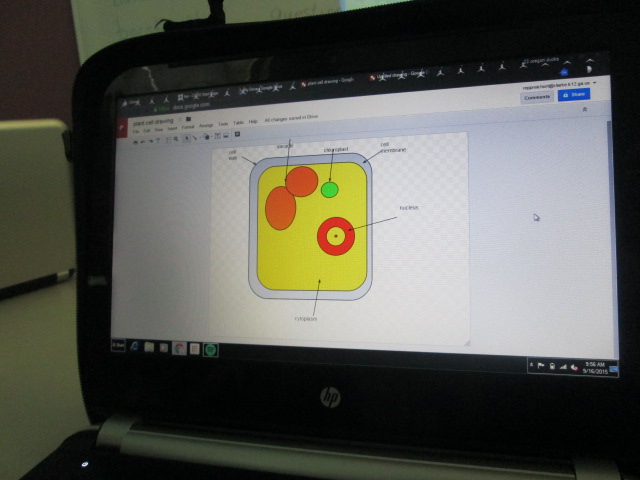
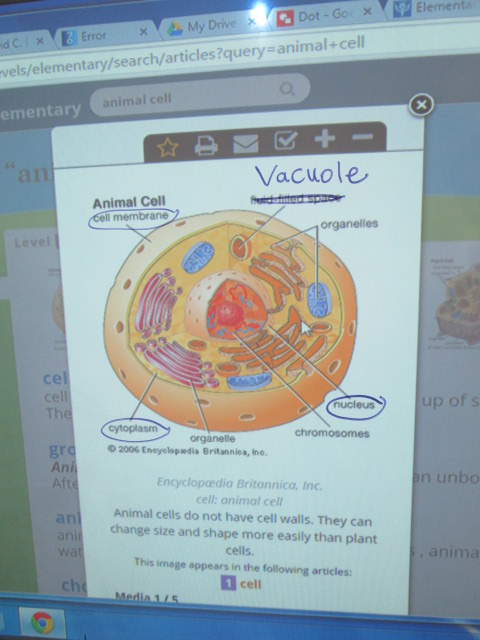
Mrs. Freeman, the reading teacher, and I transitioned students from tinkering into using Google Drawing to make a cell for Dot Day. We pulled up some examples of animal and plant cells and then students referenced those as they drew and labeled their cells.
One of the things I loved was walking around and seeing how unique each student made his/her cell. One student talked about how the organelles looked like bacon so he actually imported a picture of bacon into his cell drawing. Awesome!
As we neared the end of our time, we took a moment to highlight various student work. It was selected for many reasons, not just because it had all of the parts of a cell labeled.
We closed by once again revisiting the idea that by trying a new tool, we are opening up possibilities for future projects and creations that might lead us to making our mark on the world in some fantastic way.
I recently rolled out our 1 to 1 devices to grades 3-5. During this orientation, I talked with students about digital leadership. Since then, our oldest grades have started taking their computers home, but our 3rd graders are still waiting. It’s their first year with their own computer and we are trying to do a better job of helping them understand what kinds of things they can do with their computer when they take it home.
The third grade teachers chatted with me about digital leadership and digital citizenship and we thought about what would be the most important thing to explore next. We looked at Common Sense Media and their scope and sequence. We also talked about ideas that I planted during the orientation.
Based on our discussions, I decided to focus on our digital snapshots. What are we currently doing with technology? What do we want to strive to do with technology? What is ok to share? What do we keep private?
I created a short set of slides to guide our conversation, and I’m fascinated by some of the things that came up. I started with a small piece of my own digital snapshot.
It contained my blog as well as a screenshot of my home screen on my iPhone. I asked students to look at this one piece of my digital life and see what they could learn about how I use technology. They had conversations with partners and I eavesdropped. I heard things like:
He misses a lot of calls and doesn’t answer his text messages
He likes to share things
He takes a lot of pictures
He likes to travel
He is very organized with his apps
He uses his phone to look up books in the library
He has 2 kids
The list continued to grow with each class, and each class inferred something more than the last class. I was actually amazed about how much they could learn from me just by focusing on my phone. In fact, that’s all they focused on. Not a single student talked about the picture of my blog. There focus was completely on the apps on my phone, which was also interesting to me.
I used their noticings to connect to some of the decisions I make as a user of technology. I talked about how I know when I share a picture or a blog post that it is going to be seen around the world. I once again shared our blog map to remind students where people are looking at our work.
Next, I had students talk with partners about what their digital snapshots look like. How are they using technology in their everyday lives? We started adding some of these ideas to a doc. We didn’t capture everything, but I at least wanted a list we could refer to.
All of this was leading up to us spending more time talking about using our devices in school and at home for educational purposes. I loved having this list because most students thought it was bad for them to go onto Youtube. Many were surprised when I talked about all of the great things Youtube is for. In most classes, we spent a bit of time brainstorming why we might use Youtube. This list also gave me some insight into what students are doing at home that I haven’t even heard of.
After students reflected on their own digital snapshot, I showed students what other students have already done at our school with technology. I couldn’t show everything, but I gave them a quick look at pictures to show some of the awesome ways we’ve used technology to connect, collaborate, create, and share.
Finally, I asked students to spend time brainstorming how they might use their 1:1 technology. This was only a starting place. Many students focused on videos, games, or websites they might visit, so we have some work to do in regards to thinking about our devices as creation tools and tools that connect us to opportunities. Students added their ideas for how to use technology at home and keep it connected with learning and appropriate use for an elementary student to a padlet.
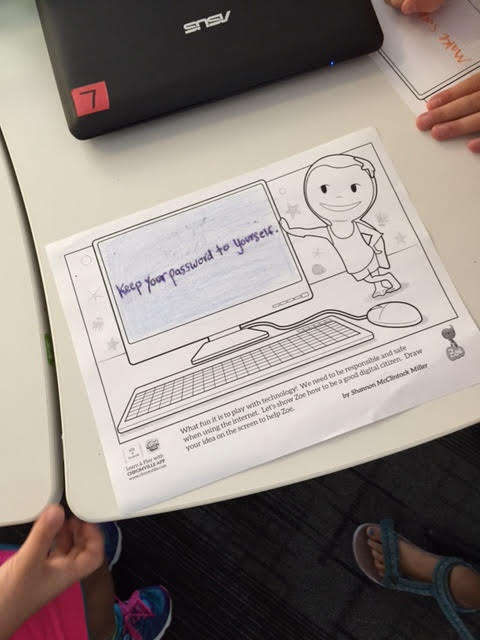
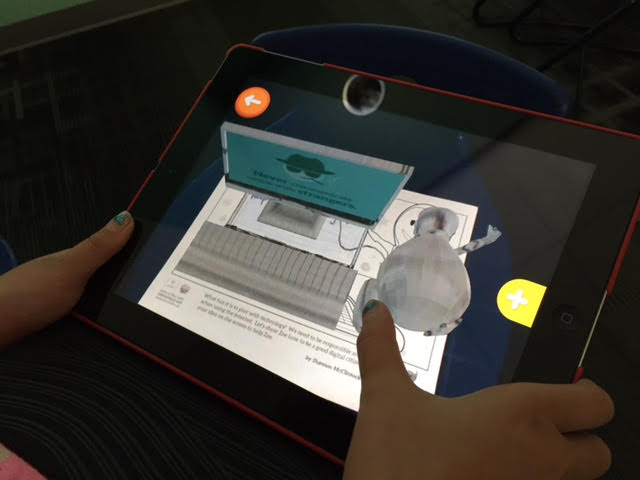
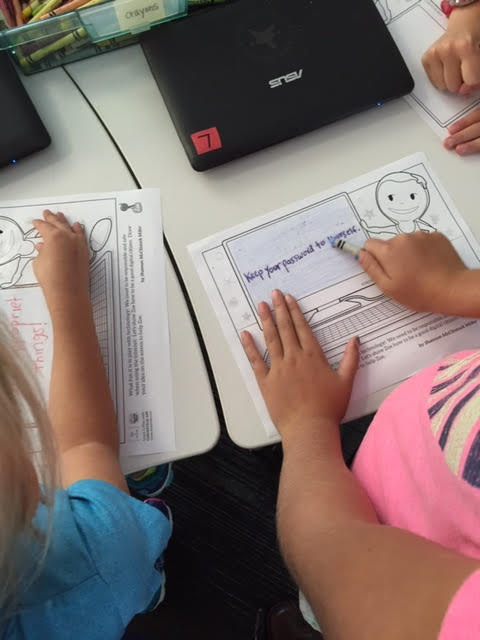
Some students were also able to move on to a wonderful coloring page from the augmented reality app, Chromville. This coloring page features Zoe and a computer screen.
Students can draw or write about a digital citizenship message on the screen.
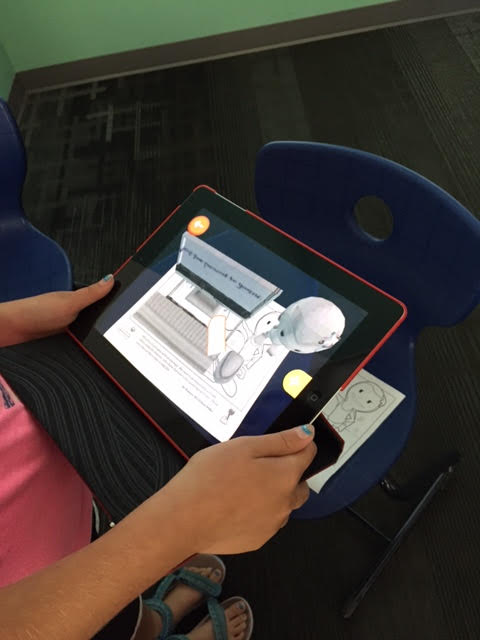
Using the Chromville app, Zoe comes to life on the screen displaying the students’ digital citizenship message and you can even click the mouse to display additional messages about staying safe online. I want to make sure all of the students get to try this out, but only a few made it this far during our hour together.
We will continue to revisit these topics in classrooms and during library projects and lessons throughout the year. If you have an innovative way to have these conversations with your students, I would love to hear them.
Our teachers LOVE the I-PICK strategy for finding good fit books. I must say that it is a strategy that just makes sense. It doesn’t focus on one aspect of locating a book that matches a reader and it adjusts to whatever the purpose is for finding a book whether it’s independent reading or reading with a partner.
The I-PICK strategy stands for:
I choose my book
Purpose: Why am a I choosing a book today?
Interest: What are the things that I like or want to learn about? What holds my attention?
Comprehend: Do I understand what’s going on by reading the words and pictures?
Know: Do I know enough of the words to understand what’s going on?
Students often learn this strategy in their classrooms, and I typically do a follow-up lesson in the library to build a connection that this is a strategy that goes beyond the classroom. This year, it seems I’m doing this lesson with almost every grade. I’m trying to build connection even beyond the school during our time together.
We start with a quick brainstorm of all of the places where we can find books. Students have named places such as school library, public library, bookstores (Barnes & Noble and Avid Bookshop), yard sales, thrift shops, and online. Then, I shared a story about my own visit to the bookstore this summer to choose a book. I wove in several things that I see students do, but honestly, that I also do. After each bullet point that I shared, we paused and asked: “Does that make this a good fit book for me?” The answer was usually “no, not completely” because each of these bullets is a piece of the puzzle of finding a good fit book and they all work together in order to make the puzzle complete.
I went to Avid Bookshop to choose a chapter book, so I focused on that section of the store
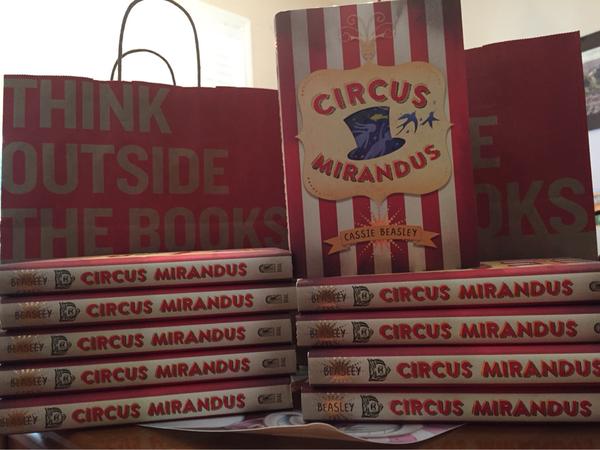
I pulled a book off of the shelf that had a red cover because that’s my favorite color. (The book happened to be Circus Mirandus)
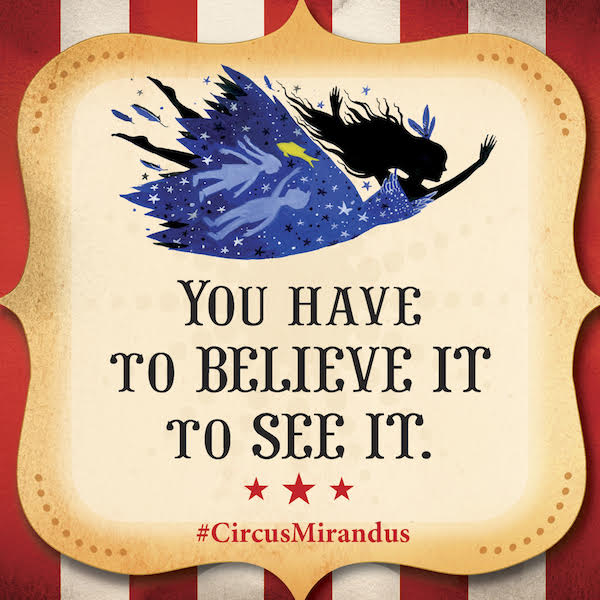
I took the jacket off because there was a picture hiding underneath and I started to notice things like the flying girl, the mysterious man in a jacket and hat, the tent with a sun on it, etc.
I read the inside jacket flap about the book
I read the first three chapters of the book because they were short
All along the way, I stayed interested in the book. I felt connected to what it was about. I understood what was going on.
I bought the book and loved it!
I don’t want to pretend that the I-PICK strategy is a linear process because it’s not. I don’t go from beginning to end of this strategy every time I choose a book. I often bounce around in the process. However, most of these pieces are usually there when I pick a book. I don’t pick a book because it’s on my Lexile level. I don’t choose a book because of how many points I get for the book. I don’t choose a book because someone puts it on a list and tells me that I have to read it. I choose my book because I’m genuinely interested in it and it speaks to my personality as a reader. I think the I-PICK strategy surfaces some of the steps that readers often do and puts them into an easy to remember formula for readers to think about as they select books.
The purpose can always change. Sometimes a reader may be looking for a book to read with a family member, so the independent comprehension or “knowing the words” doesn’t matter as much. The interest step is always there no matter the purpose. I want student to always seek books that interest them or spark their curiosity.
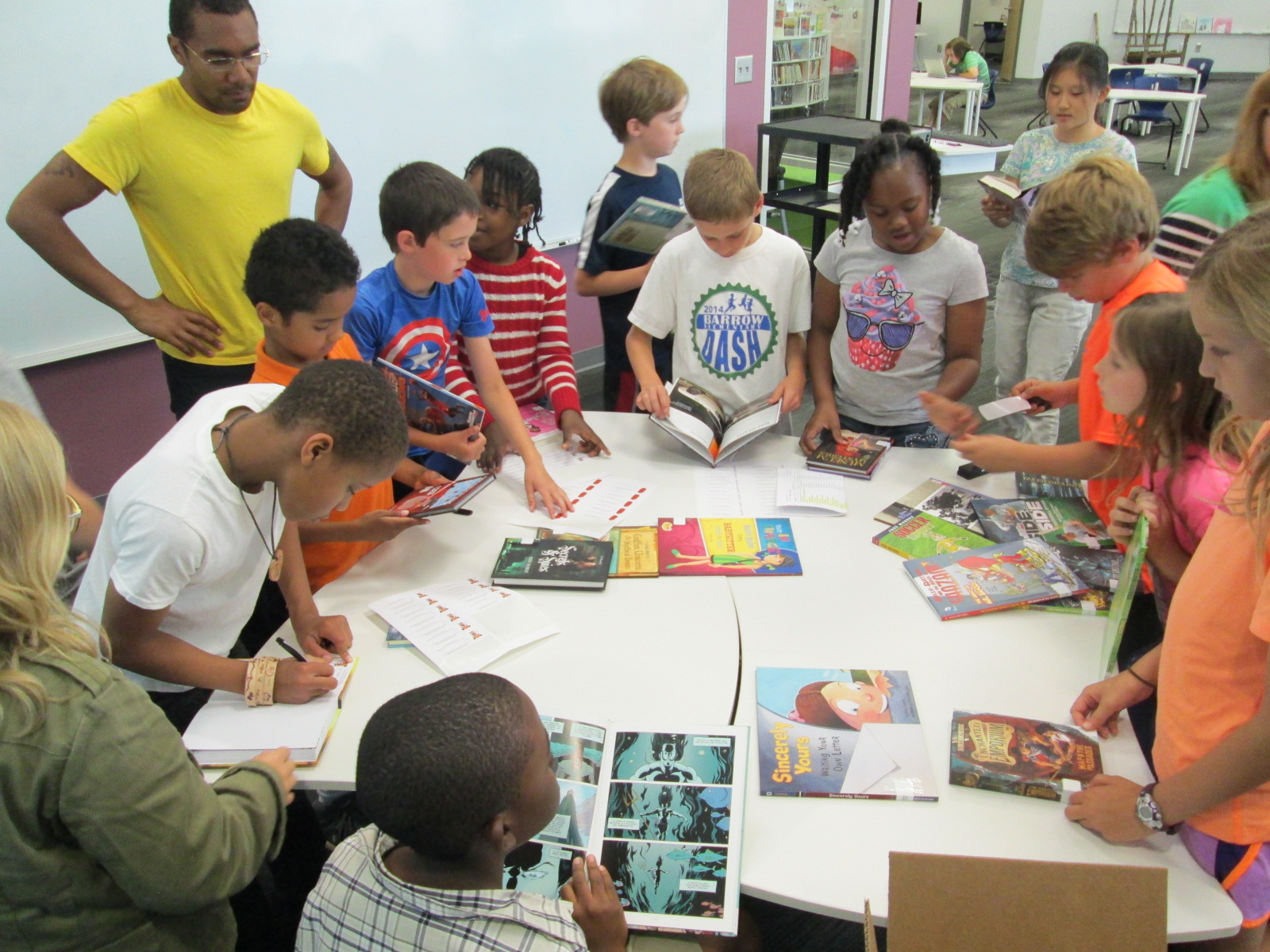
After our quick brainstorm and bookshop story on the carpet. I moved students to tables. On the tables are stacks of books pulled from all areas of the library. The idea is for students to practice the IPICK strategy in a small setting first. I know that not every student is going to find a book that interests them on the tables and that is totally ok. I do let them move from table to table if they aren’t finding an interest. Most students do find something because I choose such a variety, but some just don’t connect to what they see. The teachers and I roam around and ask students about what is catching their eye and what they’ve done to see if it’s a good fit. We might listen to them read a bit, talk about their interests, or share something they’ve learned from the book.
The next part is my favorite. I ask students about what else interests them or what else they hope to take with them from the library today. This is where I really get to focus the library on their individual interests. Sometimes it’s very broad such as “a picture book” but sometimes it is extremely specific like “Pete the Cat”. No matter what they say I direct them to a part of the library with their shelf marker to start searching for that good fit book using the IPICK strategy.
In the end, many students do in fact find books that fit their “reading level”, but more importantly find a book that they are excited about as they leave the library. Some students still leave the library with a 300 page book even though they are reading on a lower level, but to me, it’s part of the process. I can continue to share strategies for choosing books, talk about purpose, and most importantly help readers make a connection to the books that truly interest them. It’s not perfect, but it’s a big step in how we each choose the books that we read.
Just as I did for the early grades, I pondered what message I wanted our upper grades to take away from library orientation. I wanted to of course give them some reminders about routines and procedures, but I wanted them to leave with a sense that the library was a place for all readers to connect with books. I wanted them to know that if they had never found a book that they connected with that I wanted to help them find that book. If we didn’t have the book or topic in our library, then I wanted us to make sure that we did.
Over the summer, I saw John Schu post on his blog about a new site from Scholastic with the motto “Open a World of Possible”. On the site, there are several videos and resources about how reading opens possibilities for us all. One of the best videos is the one asking kids of all ages to talk about why they read.
I asked students to first think about what their answer to the question “Why do you read?” would be. I didn’t take any answers from them since I felt like it was a personal question at that moment in time and that some students may have never thought of the answer. Then, we watched the video to see if we connected to anything the students said or if their ideas sparked some of our own. At that point, instead of asking students to share aloud, I gave them an opportunity. I created a Flipgrid with that same question and told them it would be available for the next two weeks. I hoped they would think about their answer and share their voice with others in our school. I loved that some of them did this before they even left the library.
I shared with students that one of the reasons that I read is to walk in other people’s shoes, especially people who are different from me. I also love to experience things in a book that I know I would never do in real life. Books are my safe place to go into the spooky unknown, the thrill of the Hunger Games, or the magic of a schools for wizards.
Next, I shared a bit of a book that I connected with this summer called Circus Mirandus by Cassie Beasley. These grades will all have an author visit with Cassie in September, so this lesson was also a way for us to start diving into her text. I chose to read aloud starting on p. 65, which is the part where Ephraim first visits the circus as a young boy. He is a believer, so he is able to find the circus. However, he still needs a ticket to get in. It is on these pages that Ephraim discovers that every person’s ticket into Circus Mirandus is different. You can’t pay to get in but instead must offer something to the ticket taker that has a connection with who you are or simply what you have to offer. For one boy, it’s a spool of thread and for Ephraim it’s a fish.
I loved seeing so many students connect to this part of the story and want to read on. I knew they wouldn’t all connect because it’s so hard for us all to connect with the exact same book. However, this part of the story helped us talk about how we are each different. We each have interests that we bring into the library when we search for a book, and those interests are our tickets into the books on the shelves.
Beyond “why I read” and connecting through interests, students have an opportunity to explore the library and refresh their memory on checking out books, using Destiny, and finding the various sections. As in the past, I made some videos connected to QR codes. Students used iPads to watch these videos and then start checking out books when they were ready. I was able to talk to students about their interests rather than focusing on how to check out books.
I hope that students continue to think about why they read and that I can think of more ways to find out their interests and showcase their voices in the library.
Each year I ponder what to do for the first of the year library orientation. Once again, it’s a time where you want to talk about procedures, expectations, etc, but I think more and more about what message I really want students to take away.
This year we are fortunate to have author and illustrator Mike Curato coming to visit our school in October. His book Little Elliot, Big City has so many positive messages for students to start off their year. I decided to use this book as a conversation starter about problem solving, helping one another, being a good friend, and feeling welcome in such a big place.
As students entered the library, I played the book trailer.
Then, we opened with the story. Little Elliot, Big City has very few words on a page, but the discussions that can blossom from those simple words and powerful illustrations are priceless. Over the course of reading the book to students, there were certain pages that started to stand out as the pages I wanted to pause on in order to connect the book with the first visit to the library.
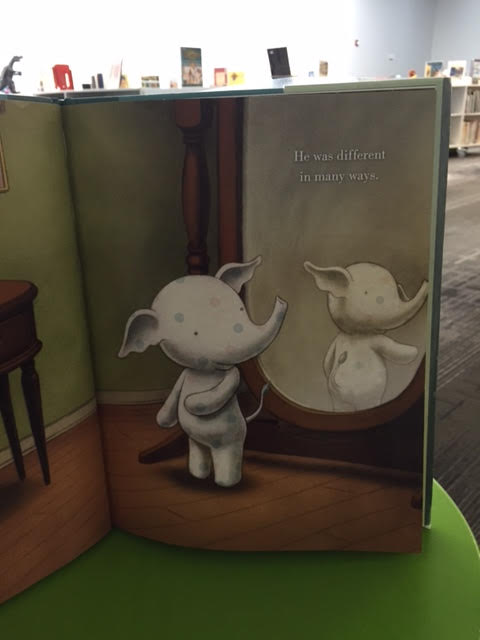
First, we paused here:
Students imagined an elephant in their mind based on what they had seen in a book, movie, or real life. Then, they talked with a partner about all of the differences. We could connect this to all kinds of library ideas such as how different we all are as readers: our interests, our stamina, our favorite authors, and more.
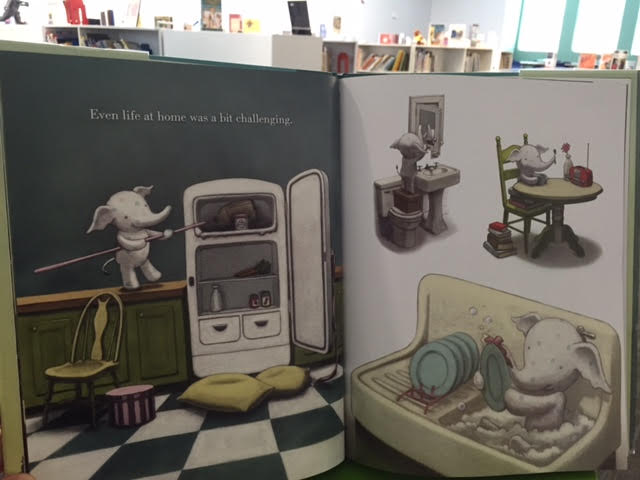
Next, we paused here:
I loved hearing students talk about this page and how Little Elliot was a problem solver. Even though things were challenging, he found ways to persevere. Again, there were so many was to connect to the library and school. We talked about the importance of not giving up, taking a deep breath, trying what seemed impossible, and the more classes I talked to the more ideas surfaced that I hadn’t even thought of.
Probably the most powerful page to talk about was here:
We saw Elliot struggle to be noticed as he went into the city to buy a cupcake. Students came up with all kinds of ways that Elliot could get his cupcake, but then he leaves with nothing. We pondered the question, “Why was Elliot able to be a problem solver at home, but not in the bakery?” Students amazed me with what they said. At home, Elliot was alone and could be brave. In the city, he was shy and scared. Students also talked about how he knew how to use all the tools at his house like his chair, his books, and his broom. However, in the city, he didn’t know how to use things, so he felt helpless. Wow! The conversations just kept coming and each class had a statement that stood out. I wish I had captured the brilliance. It really made me think about all the tools students really need in order to use the library and how that can be a little scary even though I have no intention for it to feel that way. It reminded me of the importance of smiling and patience as students ask over and over how to do things like check out their own books.
Our library really is a massive place, especially for a Kindergarten through second grade student. I don’t want them to ever feel like Elliot did in the cupcake store, so we had some honest conversation about what we could all do to make sure that happened. I was honest with them about how I work alone in the library so there are times that I can’t leave a class to come over and help them. I truly want to, but sometimes it’s just hard for me to do.
Suddenly, those rules and procedures for using a shelf marker had a purpose. I wasn’t just giving students a rule for the library during orientation. I was giving them a tool just like Elliot had his broom. The shelf marker was a strategy for those times that students were unsure. We talked about going to a section of the library and really examining the books on the shelf with a shelf marker rather than searching on the computer.
We also talked about how Elliot was a helper to mouse in the story and that we really all have to be like Elliot at some point. We have to help one another. We can’t wait on one person to be the person to help us. Whether it’s another adult roaming the library, a student from another class, or a volunteer, we can ask anyone in the library to help us access what we want.
I really didn’t plan for Elliot to have so many connections to library orientation, but he did. It just evolved. Students left with a positive story, a strategy for finding books, and I hope a sense that the library is a welcoming place where we all take responsibility to help one another.
Our 3rd-5th graders all have their own personal learning device assigned to them at the beginning of the year. This device gets checked out to them just like a textbook and remains with them throughout the school year. Students also take this device home. Currently, our 3rd graders each receive an ASUS netbook and our 4th & 5th graders receive an HP laptop.
There are so many rules that you want to talk to students about when it comes to their computers in order to keep the computer and the students safe. However, I want students to get their device with more than just a set of rules. I want students to realize the power of the device they hold in their hands. I want them to realize that their device connects them to the information that answers just about any question they could dream up. It connects them to people and cultures they may never experience on their own. It connects them with authors, developers, and experts on any topic of interest. It allows them to collaborate with students and classrooms around the world.
I really wrestled with exactly what I wanted to do as students come to get their device from the library. Should I just check it out and do digital citizenship lessons later? Should I go over the list of rules from the student handbook? Should I focus on the kinds of projects we would do with the devices during the year?
I want students to leave our library with their personal learning device feeling like they are digital leaders and changemakers. #tlchat
As I was pondering, I turned to a few resources to spark my thoughts. One resource was Be a Changemaker by Laurie Ann Thompson. This text features students who have all done something to create change in their schools or communities. Each chapter takes a different aspect of being a changemaker and profiles a student who did something amazing. They don’t all necessarily feature something digital, but the idea of using our technology to foster change was intriguing to me.
“Don’t wait. Don’t wait to be powerful, to change the lives and communities around you significantly. There is nothing like it. Once you discover that you can visualize the next step society should take, and then you discover that you can lead others to turn your vision into reality, you can do anything.”
I also turned to the blog of George Couros. I often find inspiration from this transformational principal’s blog. He has written several times about digital leadership. He defines digital leadership as “using the vast reach of technology (especially the use of social media) to improve the lives, well-being, and circumstances of others. His post about digital leadership vs. cyberbullying really made me think about what I wanted to emphasize with the students. Rather than focus on every bad thing that could happen with devices, I wanted the main focus to be on the good that we could do.
So…what did I do? First, I’ll say that I finally just had to try something and see where it went. I don’t think that what I did was special, but it was a start to a conversation and something I will keep revisiting.
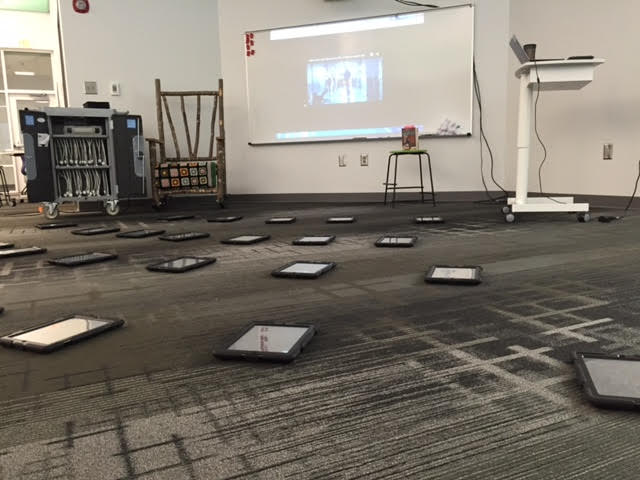
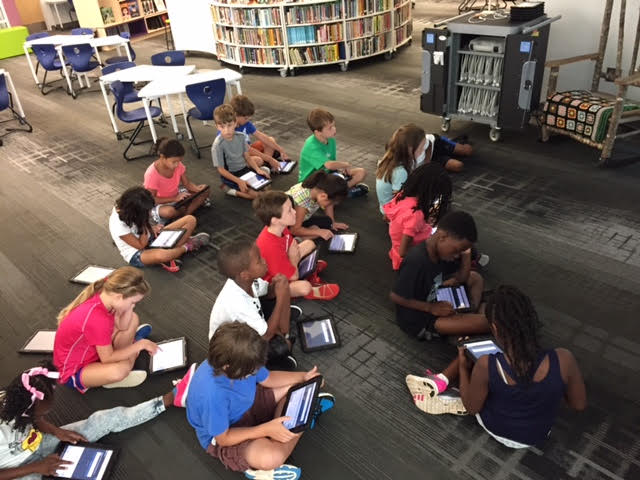
As students entered, they each came to an iPad on the carpet and I had this video playing.
We used this video to talk about how doing good deeds can spread. We also used the video to talk about how technology isn’t always visible. The awesome projects that we create using technology hide on our computers unless we share them. On the same note, the bad things that happen like cyberbullying may go unnoticed unless students take leadership and speak up to people who can support them. This is a conversation that evolved as the classes continued to come and something I didn’t really plan initially for this video.
Next, I introduced the idea of digital leadership and being a changemaker using Laurie Ann Thompson’s book foreward and student profile on page. 137. I also used this video.
I also shared myself by showing how I use this blog to highlight the incredible work of our students. I showed our map of visitors since April. Students saw every place in the world where people were reading about the work going on in our library.
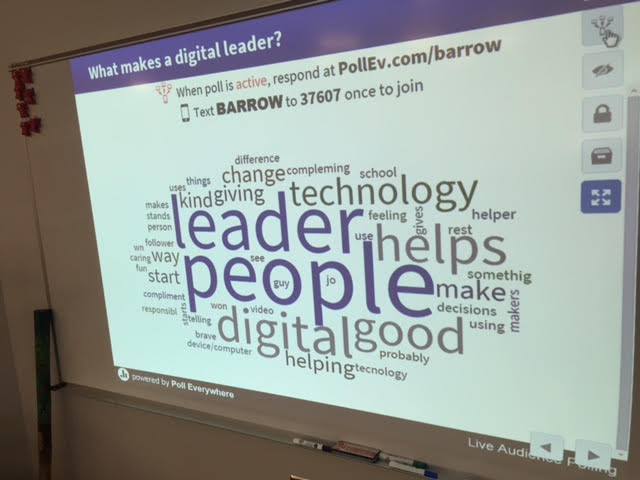
With all of these pieces, I asked students to think about what it means to be a digital leader. A digital leader is a person who _____________. Then, using Poll Everywher, students submitted their thoughts using the iPads. I setup the poll to populate as a word cloud. As students submitted answers the words grew in size as they were repeated. I deactivated the poll and we used the word cloud to talk about how the words connected with “digital leader”.
Most of the time, something about being responsible came up in the digital leadership word clouds, so the next thing we did was create a second word cloud about the things we needed to do this year to be responsible with our devices. Again, students submitted via the iPads. This cloud mostly focused on being careful with devices, keeping them charged, not losing them, etc.
Really with both of these questions, students hit most of the topics that I would have covered on my own. I had a set of slides that was shared between the other librarians in the district that included lots of rules for the devices, so I used those slides to fill in the holes from the word clouds. We covered a few missing pieces such as keeping your password secure and having a plan for where to keep your computer outside of school.
I hope that in going over a few “rules” that I didn’t lose the concept of being a digital leader. I’m not sure. However, I felt like kids were leaving excited about getting their device and being in general agreement about the potential of the device they held in their hands.
I look forward to this year and seeing what we create with these devices, what change we foster in our school and community, and how our students use technology for good.
Entertaining a 5 year old and 3 year old during the summer is a big job. I love being a parent, and it has made me grow so much as an educator. Summertime brings many days of opportunities for adventures. We get out of the house every single day and go somewhere whether it’s the botanical gardens, the local UGA campus, the local zoo,a movie, or the pool. In between all of the fighting that happens between a brother and sister, there is a lot of curiosity about the world, and I love watching this unfold during the summer.
Recently, Athens held its big summer music festival, Athfest. A part of this festival is an artist market, and my kids loved seeing what was in each tent. Their attention was most drawn to a booth of fairy gardens. These artists had created living pieces of art inside picture frames and jars. They had made every single item in the gardens. Building on my kids’ curiosity of this art, I decided we would make fairy gardens one day. The only instructions we had were the memories of what we had seen at Athfest. I intentionally did not look up examples on the computer because this was not a copying activity. I wanted this to be full of investigation, dreaming, tinkering, and creating. In fact, I really love not planning out every single detail of what we do because I can just see where the curiosity takes us.
We started by looking around our house for fairy homes. We looked at several pickle and jelly jars as well as empty flower pots. Alora and Anderson each chose their favorite.
Then, we had an outing to the local hobby and craft store to find trinkets for the fairies. I didn’t have a specific budget in mind, but I like a good bargain, so I didn’t plan to spend very much. We got a basket and each child got to put things into the basket as possibilities. There’s not really a “fairy garden” section in the store so you have to really wander around with a fairy eye and think about what a fairy might like in his or her house. We spent a good amount of time in the dollhouse section of the store. Finally we made our way to the clearance section which was a hodge podge of all kinds of stuff. We really had to dig here. After the basket had a good amount of stuff, I got out my phone calculator and started looking through the basket. We sorted piles of “definitely want”, “kind of want”, and “don’t want”. As Alora and Anderson were making those decisions, we talked about price and also how many items were in each pack. They knew they would be sharing so they were more interested in packs that had multiple items in them that could be split up. After agreeing on an amount, we visited the register, chatted with the cashier about fairy gardens, and paid our bill.
Back home, we took to the outdoors with a basket. We did a nature walk and collected free items for our gardens. On our walk, we talked about what to touch and what not to touch. We collected sticks, rocks, pine cones, moss, and leaves. Finally, we prepped our fairy gardens. Again, we didn’t specifically look up what we should put, but we talked a bit about the layers in the Earth and decided to make some layers in our gardens. We filled the bottom with rocks. We didn’t have any sand, but we noticed that there were some rocks along the sides of the house that had been broken down a lot by the water gushing out of the gutters. We talked about the rock cycle and erosion while we shoveled up some of this sand and bits of rocks to make another layer. Finally, we put a layer of dirt.
Back inside, we added some water to pack everything together a bit and then topped our containers off with some moss. We spread out all of the items from our nature walk as well as all of our trinkets from the store. They both started placing items into the gardens and making decisions about what the fairies would like the most.
When their construction was complete, we topped off each garden with a metal candle shade from our junk closet and placed all of the remaining items in a ziploc bag so that they could trade out things in the gardens when they wanted to. The gardens went to each child’s room. At bedtime, I went in Alora’s room and she was busy once again. On her own, she had gotten a roll of tape and a ziploc bag. The ziploc was on top of the metal shade and was securely taped on. When I asked about it, she told me that if a fairy went inside she didn’t want it to get out. Nevermind the gaping hole on the front of her flowerpot. I loved how she was already extending what we had started.
It really wasn’t until that moment that I started reflecting on the whole experience: where we had been, where we could go, and what implications it had for my own teaching.
A Few Topics We Explored:
perspective through the eyes of a fairy
financial literacy through budgeting and decision making
speaking and listening
layers of the Earth
habitats
erosion and rock cycle
plant identification
problem solving
reusing
safety
art
creativity
A Few Potential Extensions:
reading fairy stories to learn more about fairy behaviors and needs
building upon Alora’s idea of a fairy trap. We could use littlebits to make an alarm to alert us when a fairy is inside.
adding electronics and circuitry to our garden. To give the appearance of a fairy or even to add some light for an existing fairy, we could use littlebits or leds with coin cell batteries. This could lead to a whole exploration of circuits and electricity.
spending more time learning about terrariums and the types of plants that could live inside a jar.
storytelling based on our fairies and fairy gardens.
Some Takeaways
Some of the best learning experiences can happen when you don’t have every detail planned out. We had a goal, which was to build a fairy garden, but we didn’t lock ourselves into a series of steps. While I love to plan, I think we often miss out on some incredible learning opportunities with students when we aren’t observing, pausing, listening, and reflecting.
Our library makerspaces are a place where these types of experiences can launch, but the space alone does not create the learning. I add a few layers to our makerspace each year. More stuff brings more possibilities. However, I learned last year that you can’t just turn kids loose in the makerspace and expect that they are going to come out with an amazing project. There’s a big inquiry piece that is amplified through conversations with an educator like the librarian. Kids can come into the makerspace to dream, tinker, and create, but it is up to us to be observing, listening, reflecting, and inquiring to take the student learning to the next level.
When students are engaged through something that is of their own interests, multiple required standards can be woven in. They may not happen on the timeline that comes from the district or state, but they can be woven in. My struggle, just like many educators, is how to replicate this type of individual experience with a class of 25-30 students. It can be done. I believe it can, but it is very tricky.
I thought back to my experiences with Kelly Hocking, a kindergarten teacher at our school. She can take just about any topic that most of the class is interested in and create a magical year long project that weaves in multiple standards, experiences, and projects. The fairy garden could easily be that kind of project, but I’m not telling everyone to go out and make fairy gardens. I think we need to listen to our students’ voices, find their interests, and somehow find connecting threads that allow us to create projects and experiences that honor those while still upholding the standards we are required to teach.
I know there is more here, but my brain is in summer mode and I’m still trying to entertain a 3 and 5 year old as I write. I’m going to continue thinking on this. If you have your own thoughts, ideas, extensions, takeaways, etc, please leave them in the comments.
Back in March, James Patterson and Scholastic announced an incredible opportunity for school libraries around the country. From the official press release:
March 9, 2015 — New York, NY — As part of an ongoing effort to keep books and reading a number one priority in the United States, James Patterson has announced that he will donate $1.25 million to school libraries this year. In the first-ever partnership of its kind, Patterson is joining forces with Scholastic Reading Club to administer funding applications to their network of 62,000 schools and 800,000 teachers. Scholastic will match each dollar with “Bonus Points,” which teachers can use to acquire books and other materials for their classrooms, at every school that receives an award. Applications to nominate a school library for a donation can be found here: www.scholastic.com/pattersonpartnership.
James Patterson is donating this money because he believes that fewer children are growing up in a household full of books – and that the effects of this absence could have a profound impact on a child’s future, and on the future of our country. Every child in America should have access to books and a functioning school library, and he believes that improvements in school libraries will foster children’s love of reading and boost their academic achievement overall.
I immediately took advantage of this opportunity by writing a 300 word or less application for our library. My hope was to get a $10,000 grant to support our student book budget project. Here’s what I wrote:
Each year, I reserve $1000 in the library budget for a project called “Student Book Budgets”. This money is completely controlled by students to purchase books for the library that matches the reading interests of the entire school. Over time, we have developed a dependable process. A group of students is chosen based on a variety of criteria, including students who have trouble finding books.They create a survey in Google forms and use iPads to survey all grades. The students analyze the data to see what the top reading interests are. They establish goals and divide the budget among these goals. We send our goals to library vendors who bring in matching book samples and catalogs. Students make wish lists that exceed our budget. Students narrow the list to match our budget. Tough decisions are made about which books to keep and eliminate. I order the finalized lists. While we wait, students come up with a marketing plan. The students unpack the books and get the honors of the first checkouts. Within hours of putting the books out, they are all checked out and remain among the most popular books.I have shared this process on the national level and many libraries have benefited from the idea. The problem with this process is that we obtain an entire school’s reading interests, but our limited budget only allows us to honor a few of them. If we have $10,000, we could expand our reach to include more student interests and not feel that all of our work creating lists of books is whittled away during the budget process. I am confident that we could spend the money in a way that values the reading interests of our entire school.
In May, I received an email letting me know that I was a finalist for the grant, but I of course had to keep that a secret, which was very hard to do! I submitted some additional info and waited some more. Then, in late May, my principal received the call. Our library was award a $5000 grant from James Patterson with a $5000 matching grant from Scholastic Book Clubs, so we essentially have $10,000 between vendors of our choice and Scholastic Book Club to support our student book budget for the 2015-2016 school year.
I plan to start this project very early in the school year and involve as many students as possible so that students can enjoy the books that we purchase throughout the school year. Thank you James Patterson for believing in the power of libraries. Thank you Scholastic for amplifying this opportunity and matching it with your own resources. Congratulations to all of the libraries who received grants in this first round of announcements! I can’t wait to share the news with this year’s book budget students and blog about our process in selecting books.
I have to take a moment to brag on another teacher and group of students in our school. Kelly Hocking is an amazing Kindergarten teacher, and she has a talented group of Kindergarten students who are some of the biggest researchers and creators in our school. I love how each year she finds something that her class takes an interest in and somehow weaves into every subject area and standard that they study in Kindergarten. One year it was art. Another year it was a study of maps and stretching the imagination. This year it was space.
Kelly never knows at what point in the year something will pop up as an interest in her class, but this year it happened when they were doing a GoNoodle. It happened to feature space, and it took the class into a series of questions and wonderings about space.
They started reading lots of books about space as well as studying the science standards about the day and night sky.
The more they read, the more they started to notice about space popping up in so many areas of their curriculum and life.
They launched into research mode and asked lots of questions. In the library and classroom they used print and digital resources to learn about the planets and collect facts about each one.
In February, the class celebrated Fat Tuesday by dressing as planets and parading around the school. Each costume was space-inspired and they handed out coins and beads to lots of classes.
Research continued in the classroom and the media center. Students used all of their facts to write a series of notes. In groups, the students put those notes in an order that made sense and prepared to make their own ebooks about space using the Storykit app.
At this point, we were approaching poetry month, so I suggested that the students think about space poetry. I connected the class with several poetry books about space, and they started crafting some poems in class. Ms. Kelly also has ukuleles in her classrooms, so the poems eventually were turned into songs with music composed by the students.
At our annual Poem In Your Pocket day, the groups of students performed their poetry songs for a live audience. We even had poet, Laura Purdie Salas, listen in to the poetry since students were inspired by her space poems and songs.
At this point in the year, lots of attention turned to Mars and space exploration. Students really didn’t want to travel to Mars themselves, but they did want to think about helping other people get there some day. We created a Padlet to collect all of our research in the library and the classroom.
Eventually, the students wanted to start making some inventions to help Mars explorers, so we did a lot of tinkering in our Makerspace. In class, students constructed elaborate prototypes of their inventions and did informational writing to accompany their creations.
If we had more time in our year, I’m sure Ms. Kelly and her students would have come up with even more miraculous things, but it truly was an amazing year of exploration and I’m glad that our library was a part of it.
You can read more about the library parts of this project in these posts:
Also, you can view Ms. Kelly’s full deck of slides which includes lyrics to a cumulative song that explores all of the planets and the facts the students learned. They performed this song at our end of the year assembly.














 Expect the Miraculous